
Pressing an SOS button starts an emergency event. It does not prove that a contact received the alert, answered a call or accepted responsibility for the wearer.
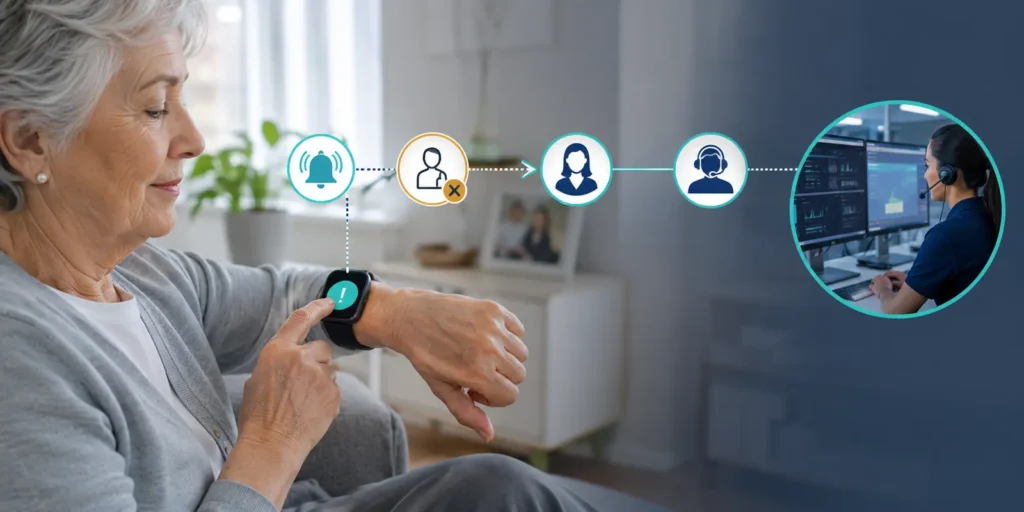
A smart watch SOS escalation workflow must define what happens when the first route fails. A caregiver may not answer. A voice call may not connect. An app notification may be delayed. The watch may lose network service before the event reaches a platform.
Without a defined exception path, an SOS feature can stop at the first unsuccessful attempt while still appearing to the wearer or platform as if the event were handled.
This guide focuses on exception handling after a manual SOS press. Automatic fall detection is a separate trigger and is not covered here.
Separate Trigger, Transmission, Acknowledgement and Response
An SOS event should not move directly from “button pressed” to “handled.”
Four states need to remain distinct.
Triggered
The wearer pressed the SOS button or activated the approved emergency control.
The device should create an event and provide appropriate feedback where supported. At this point, the system knows that an SOS action occurred. It does not know whether a remote party received it.
Transmitted
The watch or connected service attempted to send the event through the configured route.
The project should define what transmitted means. It may refer to the device sending a message, a server accepting it or another technical milestone.
A call being dialed is not the same as a call being answered.
Acknowledged
A caregiver, operator or authorized service accepted the event.
Acknowledgement should identify who accepted responsibility and when. A technical delivery receipt may be useful, but it is not automatically equivalent to human acknowledgement.
Responded
The acknowledged party completed the response action defined by the service.
That action might include speaking with the wearer, contacting an on-site team, following an organizational escalation procedure or transferring the event to another responsible service.
The device alone cannot prove that appropriate assistance reached the wearer unless the wider service records that outcome.
WearIntell works with connected wearable projects involving device hardware, firmware, voice communication and platform integration. Final event states should be confirmed against the selected system rather than inferred from a general feature list.
Build a Smart Watch SOS Escalation Order
A contact escalation order specifies who or what receives the event first and what happens when that route does not produce the required outcome.
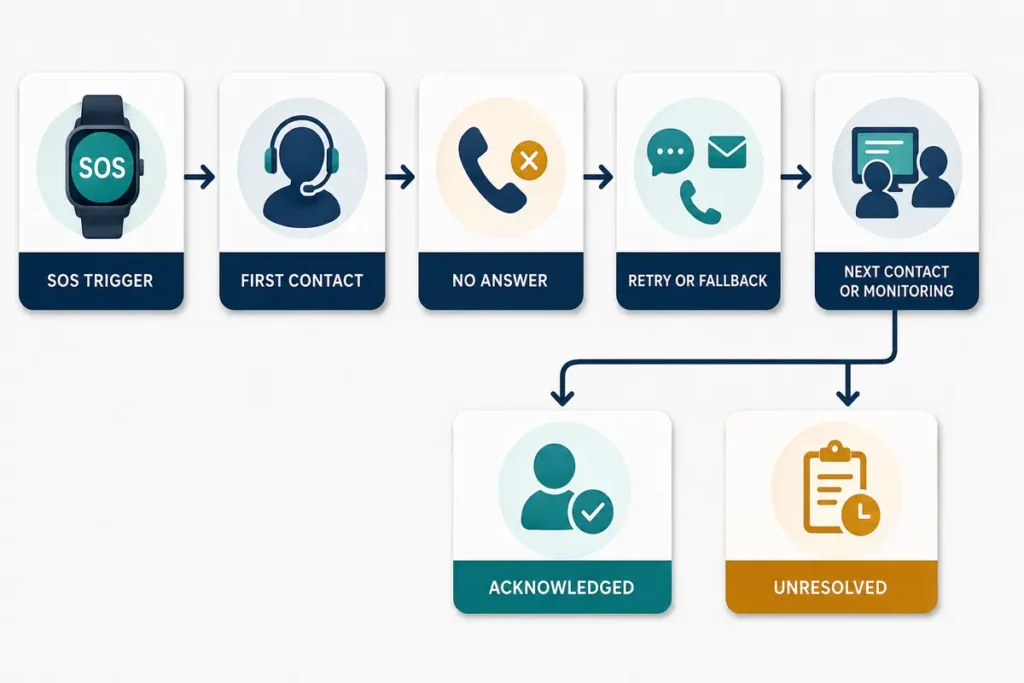
A basic sequence may be:
SOS trigger → first contact attempt → no answer or failure → configured retry or fallback → next contact or monitoring endpoint → acknowledged or unresolved
The number of contacts, attempts and timeout values should be treated as project requirements. There is no universal sequence that fits every telecare, senior-care or personal-safety service.
Decide Who Receives the Event First
The first destination may be:
- A family caregiver
- An internal care team
- A monitoring platform
- A professional response service
- Another approved endpoint
The choice affects what acknowledgement means.
A family member answering a call may be sufficient in one service. Another program may require an operator to accept the event in a platform before it is considered owned.
Define What Counts as No Answer
“No answer” should have a technical definition.
Possible outcomes include:
- The call rings without being answered
- The contact rejects the call
- The line is busy
- The network returns a connection error
- The call reaches voicemail
- The platform cannot determine the final result
These outcomes may require different next actions. Reaching voicemail, for example, should not automatically be treated the same as a network failure or an answered call.
Define When the Workflow Retries
The retry policy should specify:
- Which outcomes permit another attempt
- Whether the same contact is retried
- Whether a different channel is used
- When the next contact is attempted
- Whether a monitoring endpoint takes over
- When the event becomes unresolved
The supported retry count, timing and contact capacity must be confirmed for the target watch, firmware, network and platform.
Define What Ends the Sequence
An escalation sequence may stop when:
- An authorized person acknowledges the event
- A professional endpoint accepts ownership
- The event is closed under an approved procedure
- Every configured route has failed
A failed sequence should not disappear. It should end in a visible unresolved or failed status assigned to the responsible team.
A configurable SOS smartwatch solution should therefore be evaluated on its failure behavior as well as its ability to start a call or notification.
Use Fallback Channels with Clear Rules
Fallback channels may improve the chance that an event reaches the intended service, but they can also create duplicate ownership.
Depending on the approved configuration, an SOS workflow may use:
- Voice calling
- App or platform notification
- SMS
- A data message to a backend
- Another project-specific route
These channels are not interchangeable.
| Channel | What it can show | What it does not prove |
| Voice call | Dialing, ringing, connected or failed status where supported | That the correct person answered or understood the situation |
| App or platform event | Technical delivery, device information and workflow status | That an authorized responder saw or accepted the event |
| SMS | Message submission or delivery status where available | That the recipient read the message or took action |
| Backend data route | Event receipt and system processing | That human response has begun |
Fallback can be sequential: attempt one route, evaluate the result and then start another.
It can also be combined: send a platform event while beginning a voice call, where supported.
Combined routing may improve visibility, but the service must define which recipient becomes responsible and how other contacts are informed once acknowledgement occurs.
Define Visible SOS Failure States
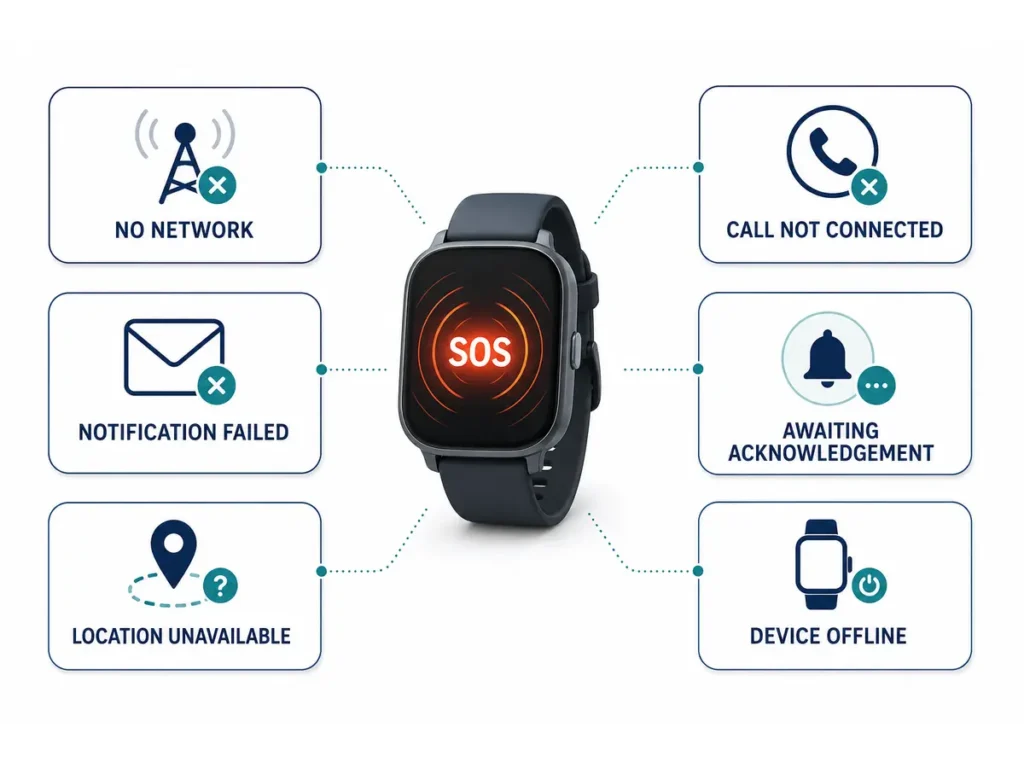
A professional workflow needs visible statuses for the most important exception conditions.
| Failure state | What the system knows | Recommended visible status | Next configured action |
| No network or registration | The watch cannot access the required communication service | SOS triggered—connection unavailable | Retry, use another supported route or retain the event |
| Call not connected | The attempt did not reach an answered state | First contact not reached | Retry or move to the next destination |
| Notification delivery failed | The app, server or channel did not confirm delivery | Notification failed | Use another channel or endpoint |
| Delivered but not acknowledged | A technical system accepted the message, but no person accepted responsibility | Awaiting acknowledgement | Continue the escalation sequence |
| Responder cannot communicate | A contact accepted the event but cannot establish useful communication | Contact reached—communication incomplete | Follow the approved handoff procedure |
| Location unavailable | No usable location result is available | SOS active—location unavailable | Continue with the available event information |
| Device offline during event | The watch stopped communicating after the trigger | Device offline during active SOS | Keep the event open or unresolved |
These statuses are workflow examples. The integration specification should confirm which events the selected device and platform can detect and report.
Keep Network and Location Status Separate
Network availability and location availability are related, but they are not the same condition.
A watch may obtain a location result but be unable to transmit it. It may have data connectivity while still being unable to obtain a useful position. A voice call may work while a platform data route is delayed.
The event record should therefore distinguish:
- SOS trigger created
- Network registration status
- Voice-call result
- Data-transmission result
- Location requested
- Location available, pending or unavailable
- Time associated with the location
- Platform acknowledgement
- Final event status
An unavailable location should not prevent the SOS event from continuing through other approved routes.
The platform should also avoid presenting an old or uncertain position as a confirmed current location. Any displayed result should include its status and time where available.
Keep the Wearer Informed
The wearer needs feedback that the button press was recognized.
Depending on the device configuration, feedback may use vibration, sound, a screen message, call-progress information or voice connection.
The wording should match what the system actually knows.
“Your SOS has been activated” may be appropriate after a valid trigger.
“Contacting your caregiver” may be appropriate while the first route is in progress.
“Contact connected” should appear only when the system has evidence of that state.
“Help is on the way” should not be displayed merely because the watch placed a call or transmitted a message. That wording implies that someone accepted responsibility and began a response.
If the first contact does not answer, the watch should not present the event as complete. Where supported, it may tell the wearer that another attempt is in progress.
Record the Complete Escalation Trail
An SOS event log should allow authorized teams to reconstruct the route from the button press to the final disposition.
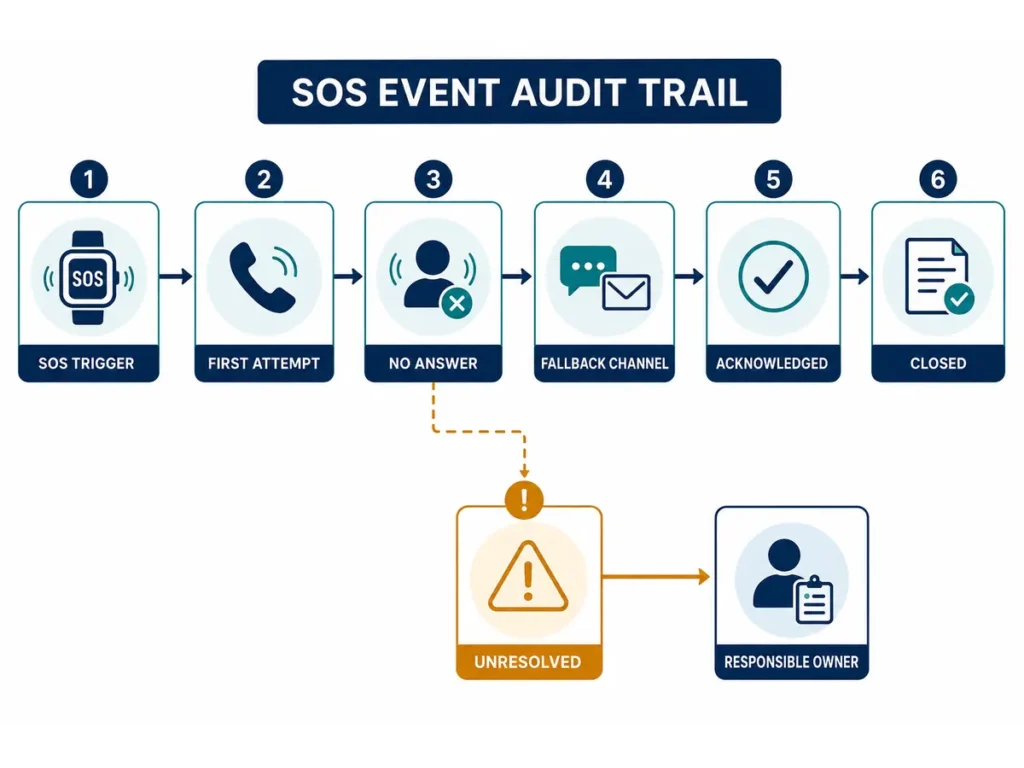
Relevant records may include:
- Event identifier
- Device and user or program identifier
- Trigger time
- Available battery and network status
- Contact order
- Call attempts and results
- Notification or message results
- Fallback channel
- Location and location status
- Acknowledgement time
- Responsible owner
- Handoff
- Device or network error
- Closure or unresolved status
- Closure reason
The record should not claim more certainty than the system provides.
If the platform knows only that a call was initiated, it should not record that the caregiver answered. If a message was delivered but not acknowledged, those states should remain separate.
Test the Entire Exception Route
Testing only a successful call leaves the most important workflow risks unexamined.
The test plan should include:
First Contact Does Not Answer
Confirm that the attempt produces the correct status and that the workflow continues according to policy. The event must not be marked as acknowledged.
Contact Phone Is Off or Unreachable
Confirm how the network result is interpreted and whether the system retries, uses another channel or moves to the next destination.
App Notification Is Delayed
Verify that technical delivery and human acknowledgement remain separate. Confirm whether another route starts while acknowledgement is pending.
Test wearer feedback, the local event record, retry behavior and platform status. Confirm what happens when connectivity returns.
Verify that the event continues with the available information and that the platform does not present an uncertain position as confirmed.
Duplicate SOS Press
Define whether another press updates the active event, creates a separate event or changes priority. The wearer should receive understandable feedback.
Device Restarts or Powers Down
Confirm whether the event can be recovered, whether the platform retains it and how operations staff see that communication stopped.
First Route Fails but Fallback Succeeds
Verify that the successful route becomes visible, the correct responder owns the event and earlier failures remain in the record.
Each test should identify the expected watch state, platform state, next action, owner and final disposition.
Assign an Owner to Unresolved Events
An SOS event needs an owner before it can be considered controlled.
The workflow should define:
- Who first receives the event
- What action counts as acknowledgement
- Whether acknowledgement creates ownership
- How ownership is transferred
- What happens when the owner cannot reach the wearer
- Who can close the event
- Which closure reasons are allowed
- What reopens a closed event
- Who reviews unresolved events
A direct-caregiver model may assign responsibility to a designated contact. A professional service may assign the event to an operator queue. An institutional program may route it to an internal care or security team.
Hardware suppliers, connectivity providers, platform operators and response services may have different responsibilities. The distinction between these service components is explained further in this guide to medical alert service costs and responsibilities.
Confirm Public Emergency-Service Calling Separately
Direct calling to a public emergency number is not a universal SOS-watch function.
Availability may depend on:
- Target-market rules
- Carrier and network support
- SIM and calling configuration
- Device certification
- Approved firmware
- Service design
- Location and call-routing requirements
- Organizational policy
A project should not claim direct emergency-service access unless the complete configuration and market requirements have been reviewed.
Where direct calling is not part of the service, the watch may contact caregivers, an internal team or a professional monitoring workflow instead.
Close Events with a Defined Disposition
An event should not close simply because the last configured contact attempt ended.
Closure should require an approved disposition, such as:
- A responder acknowledged the event and completed the required action
- The wearer confirmed that assistance was no longer needed
- The event was transferred to another responsible service
- An authorized operator closed it with a documented reason
- A technical or routing failure left it unresolved
An unresolved event should remain visible for follow-up.
If new information arrives after closure, the workflow should define whether the original event reopens or a related event is created.
Conclusion
A reliable smart watch SOS escalation workflow is defined by what happens when the first route fails.
The button press must remain separate from transmission, acknowledgement and completed response. The service needs a clear contact order, controlled retries, deliberate fallback channels, visible failure states and an owner for every active or unresolved event.
The key question is not only whether the watch can place a call. It is whether the device and platform can show what happened after no answer and move to the next approved action without promising a response that has not occurred.
FAQs
Can a smart watch SOS contact more than one person?
Some configurations support multiple contacts or an escalation sequence, but the capability is not universal. The project should confirm the contact limit, routing order, retry behavior and acknowledgement method.
What happens when the first SOS contact does not answer?
The event should move to the next configured action. This may include retrying the contact, using another supported channel, contacting the next person or escalating to a monitoring endpoint.
Can an SOS smartwatch work without cellular coverage?
The wearer may still be able to create a local event, but remote calling or alert transmission requires an available communication route. Depending on the configuration, the watch may use cellular voice, cellular data, Wi-Fi or another supported connection.
Does an SOS watch call emergency services directly?
Not necessarily. Direct public emergency-number calling depends on market rules, carrier support, device configuration, service design and approved firmware. Many programs instead contact caregivers, internal teams or professional monitoring services.
How many times should an SOS watch retry a failed call?
There is no universal retry count. The correct policy depends on the target users, contact order, network behavior, fallback channels and response model. Supported limits should be confirmed and tested for the selected system.