
Moving from a home-based alert service to a mobile medical alert system changes more than the device a user wears. It changes where protection is available, how an alert reaches the response team and what the user must do to keep the service available.
A home system normally operates around a known property and an established set of equipment. A mobile watch travels with the wearer and introduces different dependencies, including consistent wearing, charging and mobile connectivity.
The migration decision should therefore answer a practical question: which parts of the existing service should be retained, replaced or reorganized when the wearable becomes part of the response model?
This guide focuses specifically on that transition. Device specifications, interface requirements and technical acceptance should be completed separately before the service is cut over.
Start With the Reason for Moving to Mobile Alerts
A migration should solve a defined service problem.
Common reasons include extending alert access beyond the home, supporting users who spend more time in the community or reducing dependence on a fixed base unit for the primary alert action.
Write the intended outcome before selecting the transition route.
For example:
- Give a mobile user a practical way to request help away from home.
- Add location information to an existing response workflow.
- Replace a fixed alert route where the user no longer depends on home-specific equipment.
- Introduce a wearable while retaining selected household safety functions.
“Replace the old device” is not a sufficient objective. It says nothing about what must continue working after the change.
The migration plan should begin with the existing service, not with the new watch.
Decide Which Users Should Migrate
Not every user of a home alert service requires the same destination.
A simple classification is more useful than assuming that the whole population will move to a mobile-only service.
| User Path | When It May Fit |
| Retain home service | The user depends heavily on home equipment or receives little benefit from mobile coverage |
| Add a mobile watch | The user needs protection away from home but still relies on selected household functions |
| Transition gradually | Mobile service appears suitable but wearing, charging or support needs should be observed first |
| Replace the home alert route | Required home dependencies have been resolved and the mobile workflow is ready to become primary |
When reviewing suitability, consider:
- How often the user leaves the home.
- Whether the watch is likely to be worn consistently.
- Whether the SOS interaction is understandable and physically accessible.
- Whether charging can be completed with the planned level of support.
- Whether the existing service includes buttons, sensors or other equipment that the watch will not replace.
- Whether supporters and response staff understand the new mobile workflow.
A configurable elderly safety watch may support SOS, voice, location and device-status functions depending on the selected model and project configuration. Those capabilities do not automatically make every existing home-alert user suitable for migration.
Create a Home-to-Mobile Gap Register
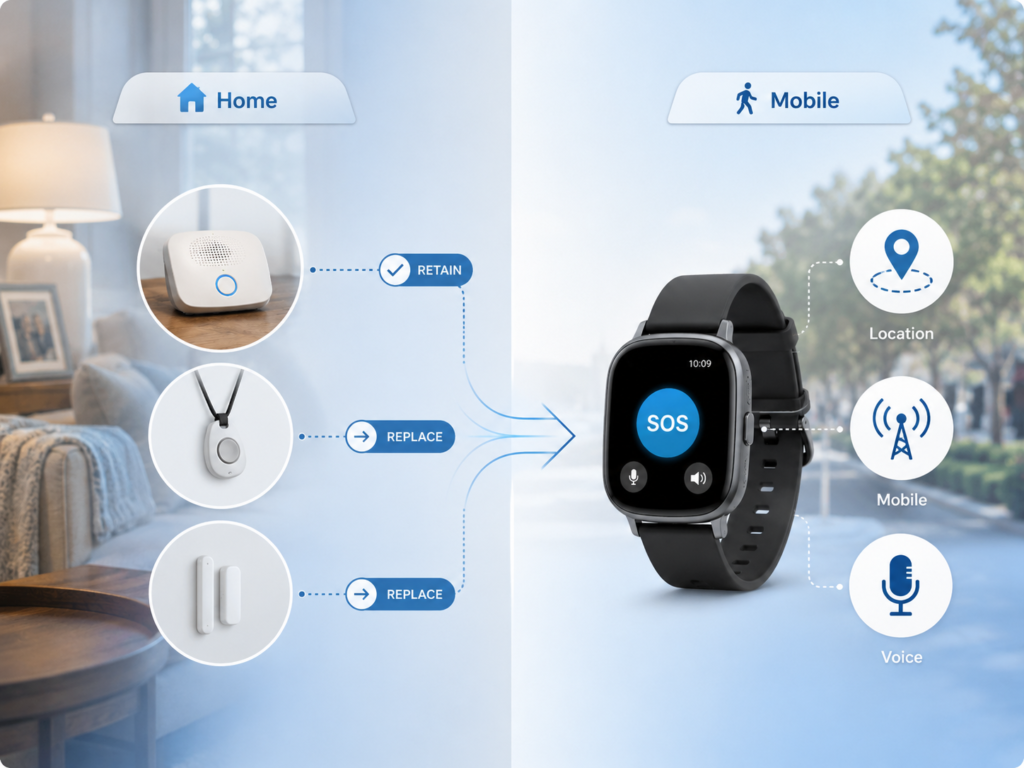
Before deactivating anything, compare the two service models function by function.
The purpose is not to prove that the watch can copy the home system. The purpose is to identify what changes when the watch becomes part of the service.
Review areas such as:
| Existing Service Element | Migration Question |
| Fixed SOS button or pendant | Where and how will the user request help after migration? |
| Room-based voice | Will communication now take place through the wrist? |
| Fixed service address | How will staff interpret mobile or last-known location? |
| Home sensors | Will they remain, be replaced or be removed? |
| Mains-backed equipment | What changes when the wearable depends on its own charging cycle? |
| Existing monitoring route | Will the new event enter the same operational queue? |
| Support procedure | Who handles device, charger or connectivity problems after migration? |
Every identified gap should have a disposition:
Retain — keep the existing function.
Replace — the mobile service takes over the requirement.
Cover operationally — use another procedure or support arrangement.
Accept as a limitation — document the difference and confirm that it is acceptable to the service owner.
Technical matters such as supported cellular bands, SIM design, event states and voice routing belong in the approved standalone medical alert smartwatch requirements. The migration document only needs to confirm that those requirements have already been resolved.
Choose a Transition Model
Three models cover most migration situations.
Mobile Supplement
The home service remains active and a mobile watch extends coverage beyond the property.
This approach can suit users who benefit from mobility but still rely on home sensors, fixed equipment or familiar household procedures.
The main operational risk is ambiguity. Users and staff should know which system should be used in different situations and how two alerts relating to the same incident will be handled.
Parallel Transition
The home and mobile services operate together for a defined transition period.
Parallel operation gives the user and support team time to establish the new routine before the previous service is removed.
However, it should not become an indefinite default. The migration record should identify:
- Why parallel operation is needed.
- What still needs to be observed.
- Who reviews the result.
- What evidence permits the old service to be removed.
Controlled Replacement
The mobile service becomes the primary alert route and the previous system is deactivated.
This should happen only when the migration gaps have been resolved and the user, response team and support process are ready for the new operating model.
The important distinction is that replacement is a service decision, not simply the date on which a new device is delivered.
Prepare the User for the New Routine

Migration training should concentrate on actions that change from the previous service.
The user should be able to demonstrate how to:
- Wear the watch correctly.
- Find and activate SOS.
- Recognize the main feedback after an action.
- Respond to a voice call where included.
- Charge the watch using the intended routine.
- Put the watch back on after charging.
- Obtain help when the watch or charger appears unavailable.
Avoid turning the handover into a long product demonstration. Users need to understand the few actions that determine whether the service works in daily life.
Supporters should receive similarly concise guidance. Their role may include charging assistance, recognizing low-battery conditions or contacting the correct support channel.
Prepare the Response Team for Mobile Events
Staff migration is as important as user migration.
A team accustomed to a fixed home alarm may have relied automatically on a registered property address. A mobile alert may provide a different location state and may require a different interpretation.
Before cutover, staff should know:
- Which users have moved to the mobile service.
- Which users still operate both systems.
- How the new event source is identified.
- What location information may be available.
- Which response policy applies.
- Where device or support issues should be referred.
- When the previous system remains relevant.
Do not assume that an existing procedure automatically applies simply because the event still contains the word “SOS.”
Use a Cutover Gate Before Removing the Old Service
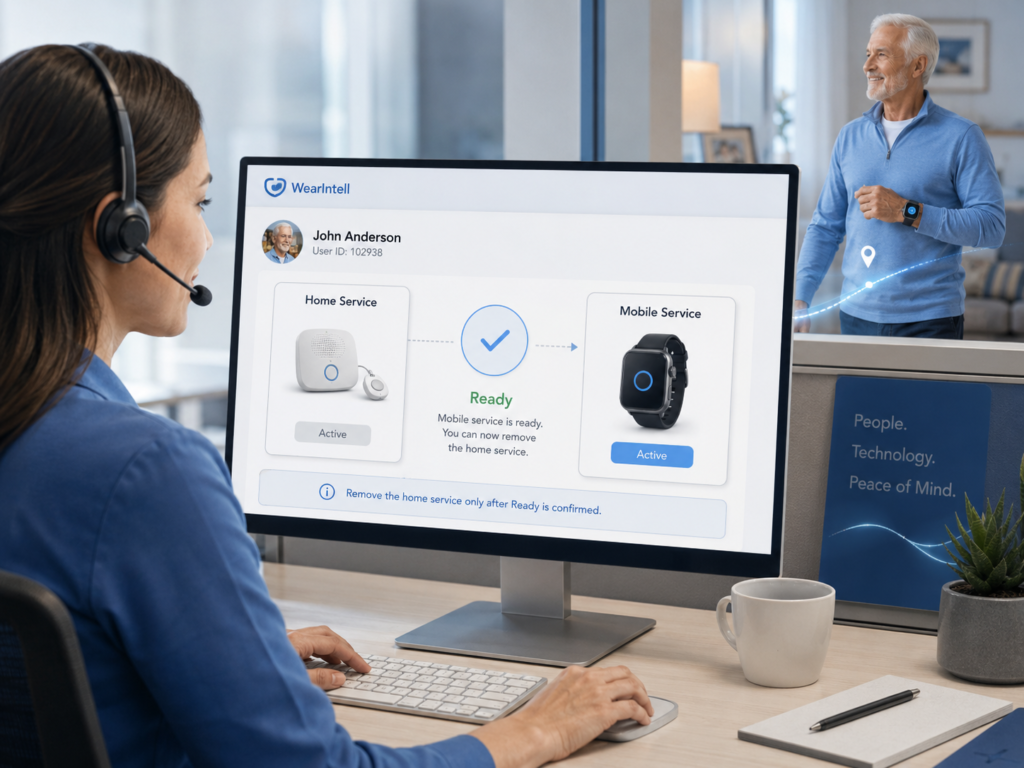
The migration should have a short operational cutover gate.
Before the previous service is removed, confirm that:
- The correct watch is assigned to the correct user.
- The approved service configuration is active.
- The user has completed the required handover actions.
- The response team recognizes the new route.
- Required home functions have been retained, replaced or formally removed.
- Support contacts and backup actions are known.
- Any open migration issue has an owner.
- The person authorized to deactivate the previous service has approved the cutover.
This is different from technical product acceptance. Engineering verification should already be complete.
The cutover gate answers one question: is this specific user and service ready to stop relying on the previous alert arrangement?
Review Early Use After the Change
A migration is not complete the moment the previous equipment is removed.
During early use, review whether the planned service matches actual behavior.
Useful observations include:
- Whether the watch is worn for the intended periods.
- Whether charging takes place as planned.
- Whether the user still attempts to use the old alert method.
- Whether the user needs repeated assistance.
- Whether response staff recognize mobile events correctly.
- Whether previously identified migration gaps remain controlled.
Each issue should lead to a practical decision.
The service may continue unchanged, require additional support, move back into parallel operation or, in some cases, return temporarily to the previous arrangement.
This keeps the migration reversible while the new routine is being established.
Record the Final Migration Decision
The final record does not need to be complex.
For each migrated user or user group, record:
- Previous service model.
- New service model.
- Functions retained from the previous system.
- Functions replaced by the wearable.
- Accepted limitations.
- Support arrangement.
- Date and owner of the cutover decision.
- Any remaining action.
For larger programs, these records also show whether the same problem is appearing repeatedly.
If many users struggle with the same charging process, for example, the issue may belong to the migration design rather than to individual users.
WearIntell can support connected wearable projects involving device configuration, firmware, connectivity and platform integration. User selection, migration policy and final service decisions remain part of the provider’s operating model.
Frequently Asked Questions
Can a mobile medical alert system completely replace a home alert system?
Sometimes, but not automatically. The answer depends on which home functions the user currently relies on and whether those requirements are covered after migration.
Should home and mobile alerts operate together during migration?
Parallel operation can be useful when the new user routine still needs to be established. It should have a defined reason, review point and decision owner rather than continue indefinitely.
What should be checked before the home alert system is removed?
Confirm user readiness, response-team readiness, support arrangements and the disposition of every important home-service dependency before approving cutover.
Planning a move from fixed home alerts to connected wearable support? Share your existing service model, user group and intended migration path with WearIntell.