
A safety watch for elderly users should be evaluated as part of an independent living service, not as a consumer smartwatch with a few safety features added. For telecare providers, senior care organizations, healthcare brands and system integrators, the main question is whether the device can support a clear emergency workflow while remaining simple enough for daily use.
That evaluation should focus on five areas: manual emergency access, two-way voice, location reporting, senior-friendly interaction and remote device management. Optional fall detection or health functions may add value, but they should not complicate the main safety experience.
Organizations reviewing an elderly safety watch solution should begin by defining what the program needs the watch to do, who will respond to alerts and how devices will be managed after deployment.
Start With the Independent Living Workflow
The same watch can be configured differently depending on the service model. A home care provider may want alerts to reach family members and a care coordinator. A telecare operator may route events to a monitoring platform. An assisted living program may need staff to manage devices for multiple residents.
Before comparing products, define:
- Who will wear the watch?
- Where will it be used?
- Who should receive an SOS alert?
- Should the watch start a voice call?
- When should location information be requested?
- Who will charge, assign and support the device?
- Which settings must be managed remotely?
These questions establish the operational role of the watch and help prevent a common procurement problem: choosing a device with many features but no clear match to the response process.
The watch can transmit an alert or open a communication channel, but it cannot guarantee that a caregiver, monitoring center or emergency service will respond. The organization operating the program remains responsible for escalation rules, staffing and follow-up procedures.
Five Core Functions to Define
A smart watch for elderly safety programs should treat the following functions as connected requirements rather than separate product checkboxes.
| Core Function | Requirement to Define | Why It Matters |
| Manual SOS | Activation, confirmation, cancellation and alert recipient | Gives the wearer a direct way to request help |
| Two-way voice | Call routing and failed-call handling | Allows the wearer and responder to clarify the situation |
| Standalone 4G | Target market, network configuration and service setup | Reduces dependence on a nearby smartphone |
| Alert-linked location | Timing, freshness and display of location data | Gives responders additional context |
| Remote management | User assignment, contact settings and device status | Supports ongoing operation across multiple devices |
The SOS control should be easy to identify and operate. Project teams should confirm the activation method, cancellation period and feedback provided to the wearer.
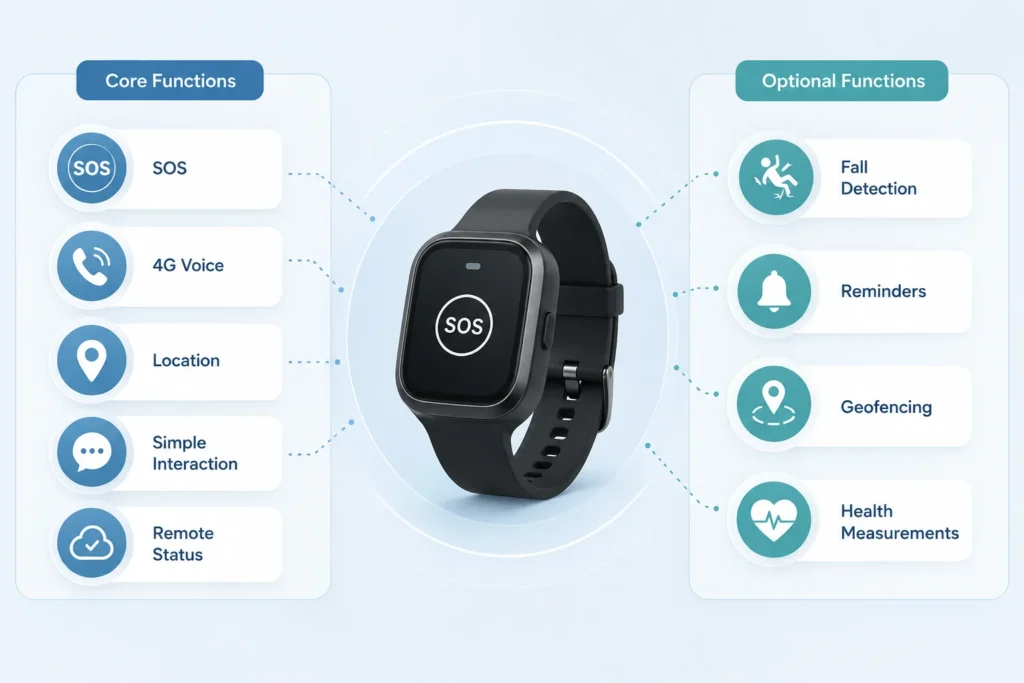
Voice requirements should state who the watch calls, what happens when the first contact does not answer and whether approved contacts can call the watch. These behaviors may be configurable depending on the device and software environment.
A standalone 4G LTE watch can communicate without relying only on a paired phone. This can be important for older adults who do not use a smartphone consistently. However, “smart watch with 4G LTE” is not a complete network specification. The final configuration must be reviewed for the target country, network and service setup.
Location is most useful when its role is defined in advance. Some programs need it only when SOS is triggered, while others require on-demand or scheduled reporting. The receiving interface should show when the location was obtained and what happens when a new position is unavailable.
For distributed programs, staff may also need to assign a watch to a user, update emergency contacts and review battery or online status. These requirements should be listed before platform discussions begin.
Separate Core, Optional and Project-Specific Functions
A clear requirement brief should distinguish between three categories.
Core functions are necessary for the basic service to operate. For most independent living programs, these include manual SOS, voice communication, suitable connectivity, location support, simple interaction and basic remote status visibility.
Optional functions may improve the service for particular users or care models. These can include fall detection, geofencing, reminders or selected health measurements.
Project-specific functions depend on the provider’s platform, target market or operating procedure. These may include customized alert routing, interface protocols, branded firmware screens, user roles or connections to an existing backend.
This classification keeps the device focused. Adding every available function can make menus harder to understand, increase management complexity and create data that the service team is not prepared to use.
Fall detection may support users who cannot press SOS after some incidents, but it should remain an additional alert trigger rather than a replacement for manual emergency access. Performance can vary with movement type, wearing position, sensor configuration, detection logic and alert settings.
The project should define how a suspected fall is confirmed, canceled and escalated without turning the general safety-watch requirement into a full fall-detection specification.
Health-related functions should be handled similarly. Monitoring or measurement functions do not provide a medical diagnosis. They should be included only when the organization has a defined reason to collect and use the data.
Projects centered mainly on one-touch emergency access may also compare the broader elderly safety configuration with an SOS smartwatch. The distinction should be based on the required workflow, not simply the product label.
Verify 4G Voice and Location as One Workflow
Connectivity, voice and location should be specified together because they often operate during the same event.
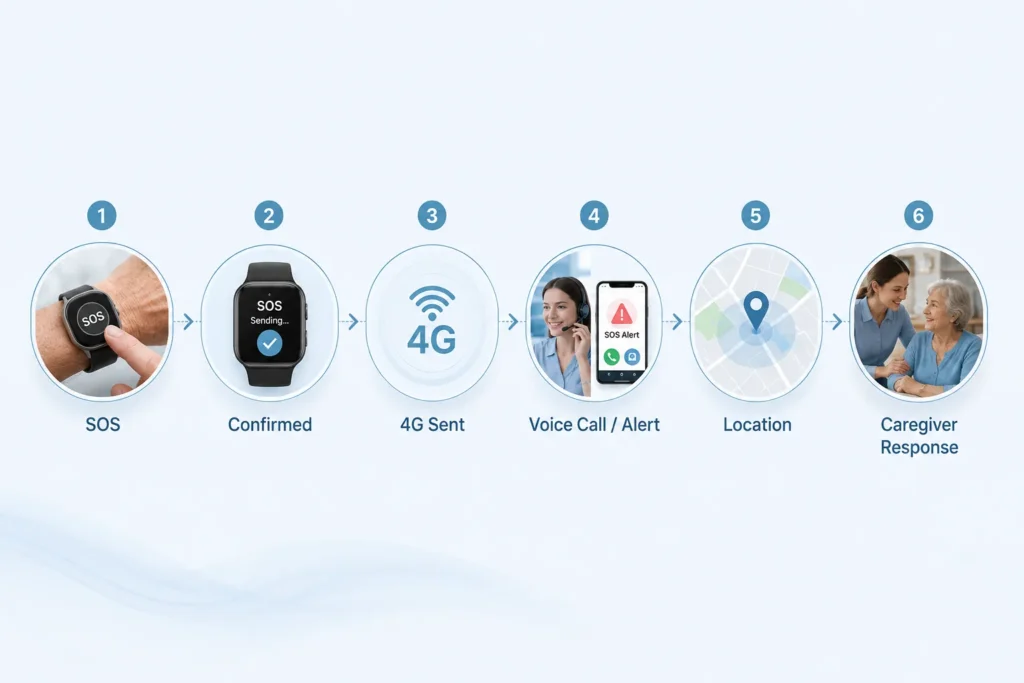
A typical sequence may be:
- The watch recognizes the SOS activation.
- The wearer receives confirmation.
- The event is transmitted through the configured network.
- A call or platform alert is initiated.
- Available location and device information reach the recipient.
- The organization follows its response procedure.
For a 4G LTE watch, buyers should confirm the intended region and network requirements before treating a reference model as deployment-ready. Supported bands, carrier compatibility, SIM provisioning and service configuration can depend on the final hardware and target market.
Voice requirements should cover:
- The first call destination
- Backup or escalation contacts
- Incoming-call behavior
- Weak-signal or failed-call handling
Location requirements should cover:
- Event-based, scheduled or on-demand reporting
- The age of the displayed location
- Last-known-location behavior
- Indoor and outdoor use expectations
- Who is allowed to view the information
The objective is not to promise uninterrupted communication or exact positioning. It is to define how the device should behave under expected service conditions and what the response team sees when information is incomplete.
Plan Remote Management for Distributed Users
Remote management is one of the clearest differences between a small device trial and an operational independent living program.
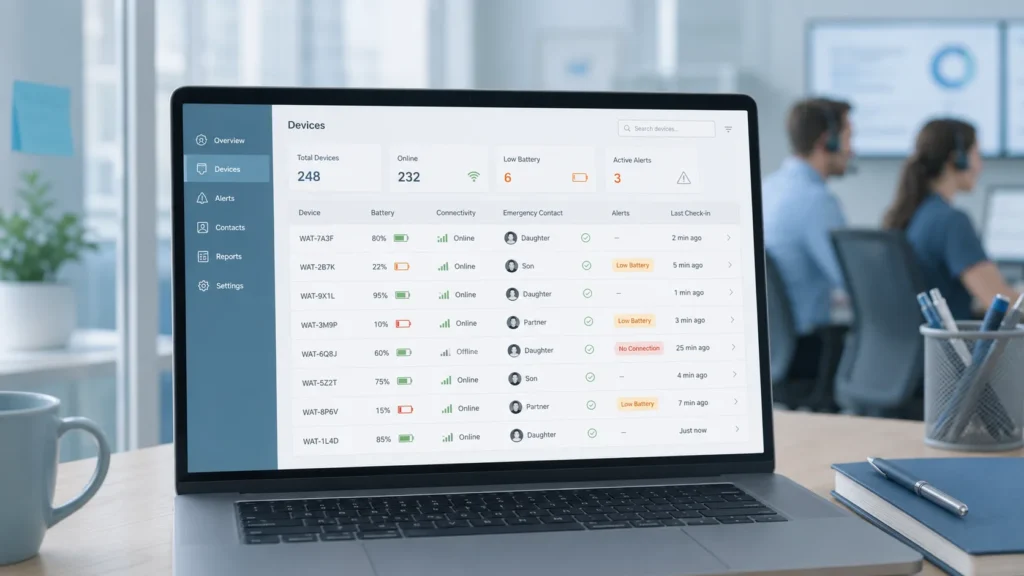
Depending on the selected platform and project configuration, relevant functions may include:
- Assigning and reassigning devices
- Managing emergency contacts
- Reviewing battery and connectivity status
- Identifying devices that have stopped reporting
- Configuring approved alert settings
- Managing user or staff permissions
- Reviewing alert and device events
- Planning firmware updates where supported
Not every program needs every function. A regional care provider with a small device fleet may use a simpler dashboard than a telecare operator managing devices across several service areas.
The important step is to define who performs each task. Care coordinators may need user and contact information, while technical staff may need device status and configuration access. Clear roles can help prevent unauthorized changes to sensitive settings or location information.
Some projects may use a supplier-provided application or dashboard. Others may need the watch to exchange approved alert, location or device-status data with an existing service platform.
Any app, cloud, API or SDK work should be included in the agreed project scope rather than assumed to be standard.
Prepare a Supplier Requirement Brief
A concise requirement brief helps suppliers recommend a realistic configuration and identify where customization is needed.
Include:
- Intended users and care environment
- Target country or markets
- Expected deployment size
- Manual SOS behavior
- Alert recipients and escalation order
- Voice call workflow
- Location reporting rules
- Required remote-management functions
- Optional fall detection, reminders or health functions
- Existing app, cloud or platform needs
- Interface and branding requirements
- Charging and onboarding responsibilities
The brief should identify which items are mandatory and which are open to supplier recommendation. This creates a more useful discussion than requesting a device with “all elderly safety functions.”
WearIntell supports elderly safety wearable projects involving hardware, embedded software, interface adaptation, app development and cloud-platform connection. The relevant scope should be selected according to the intended users, network environment, service workflow and management requirements rather than applying the same configuration to every program.
Conclusion
A safety watch for elderly independent living programs should be selected around the service workflow, not the number of functions on a product page. Manual SOS, 4G voice, location, simple interaction and remote management form the core operating framework of the program.
Optional functions can be added when they have a defined purpose, but they should not interfere with emergency access or daily usability. A clear requirement brief gives providers, system integrators and device partners a stronger basis for discussing the right configuration.
Organizations preparing an elderly safety watch deployment can share their user profile, alert process, target market and platform requirements with WearIntell to review suitable device and customization options.
Frequently Asked Questions
Does a safety watch for elderly users need a smartphone?
Not necessarily. A standalone 4G LTE watch may support alerts, voice and data communication without depending on a nearby paired smartphone. The final device still needs to be reviewed for the target market, network configuration, SIM setup and service platform.
Should fall detection be a core requirement?
It depends on the program. Manual SOS should remain available as the primary direct way to request help. Fall detection can be added as an optional alert trigger, but its performance and workflow depend on wearing position, movement pattern, device configuration and alert settings.
What remote information should a care provider monitor?
Common requirements may include device assignment, battery status, connectivity, emergency contacts and recent device or alert events. The exact information available depends on the selected platform and project configuration, so providers should list their operational needs before choosing a management system.