
An SOS smart watch for elderly safety programs should be evaluated as part of a complete alert and response workflow—not simply as a wearable with an emergency button.
For telecare providers, senior care organizations, healthcare brands and system integrators, the main questions begin after the wearer activates SOS. The project must define who receives the alert, whether voice communication starts, how available location information is presented, what happens when the first contact does not respond and how device status is managed across the deployment.
By defining these requirements before selecting hardware, organizations can compare possible devices and integration paths against their actual service model.
Map the Workflow Before Choosing an SOS Smart Watch for Elderly Programs
The physical SOS button is the starting point of the process. Its value depends on the calling, notification and escalation rules connected to it.
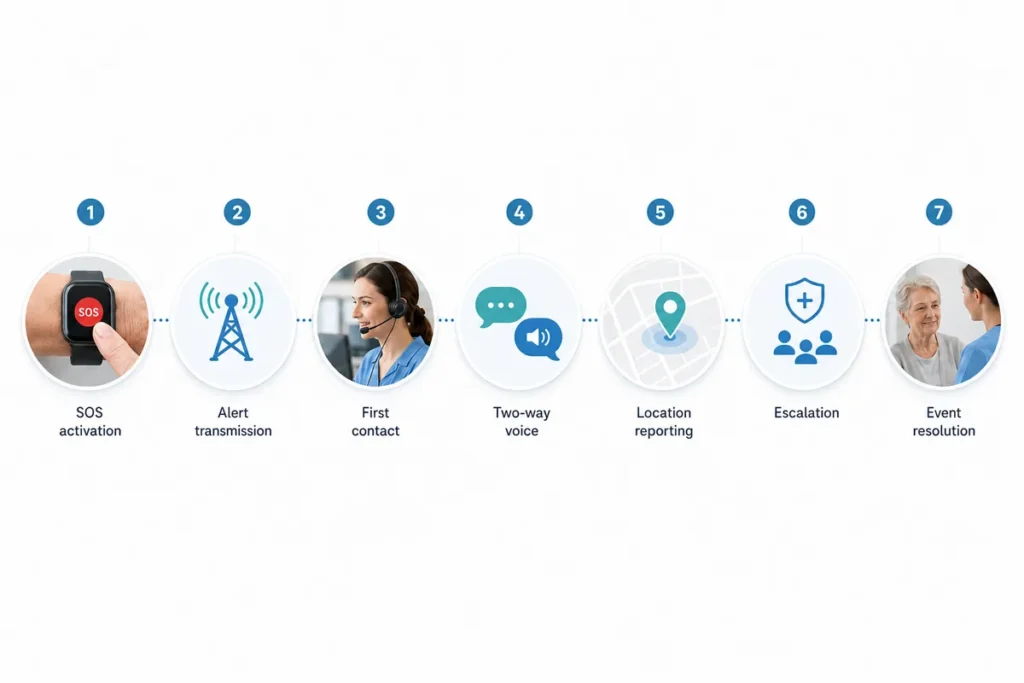
A professional SOS workflow may include the following stages:
| Workflow Stage | Requirement to Define |
| SOS activation | How the wearer starts the alert and how accidental activation is handled |
| Alert transmission | Whether the event starts a call, platform alert, application notification or another configured action |
| First contact | Which person, care team or platform receives the alert first |
| Voice communication | Whether two-way voice begins automatically or through an accepted call |
| Location reporting | When available location information is requested and how it is displayed |
| Escalation | What happens when the first contact does not answer or resolve the event |
| Resolution | How the event is closed, recorded or reviewed |
These stages should reflect the provider’s real operating procedures. A long list of contacts does not create an effective response process unless responsibilities are clearly assigned.
The project team should determine who owns the alert at each stage, how long the system waits before escalating and how staff avoid duplicate or conflicting responses.
Network availability, device status, contact availability and platform operation may all affect the result of an SOS event. A wearable can support the response workflow, but it cannot guarantee that assistance will always be delivered.
Once the required workflow has been documented, project teams can review the WearIntell SOS smartwatch and evaluate whether the available hardware and integration options fit the intended program.
Define SOS Button and Two-Way Voice Requirements
A physical button can provide a clearer activation method than a touchscreen menu, particularly for older users who may have reduced vision, limited dexterity or difficulty navigating multiple interface steps.
However, the presence of a physical button does not confirm that it is suitable for every user group. The button design and activation logic should be tested in relation to the intended wearer and care environment.
Project teams should confirm:
- Whether the button is easy to locate by touch
- Whether activation requires a short press, long press or another action
- Whether the activation method reduces unintended alerts without becoming difficult to use
- Whether the wearer receives clear confirmation that the alert has started
- Whether an accidental alert can be cancelled
- How long the cancellation period lasts
- Whether activation behavior can be configured for the project
Depending on the selected device and configuration, confirmation may be provided through the screen, sound, vibration or another interface response. The required feedback method should be verified during project testing rather than assumed from a general feature description.
Review the Complete Voice-Calling Process
Two-way voice may allow a caregiver, monitoring team or designated contact to speak with the wearer after an alert. This can help the recipient understand what happened and determine the next response step.
Buyers should evaluate more than whether the specification sheet lists a microphone and speaker. The complete calling behavior should be reviewed.
Important questions include:
- Which contact is called first?
- Does the watch call contacts directly or route the event through a platform?
- Are contacts called sequentially?
- How long does each call attempt continue?
- What happens when a call is unanswered?
- Can the wearer cancel or end the call?
- Can an incoming callback be answered easily?
- How is call status communicated to the platform?
- Can contact details be updated remotely?
The expected use environment also matters. A device used in a quiet home may face different acoustic conditions from one used in a care facility, assisted-living community or outdoor safety program.
Speaker volume, microphone placement, wearing position and surrounding noise may affect communication. Voice performance should therefore be tested in situations that reflect the intended deployment.
Set Contact-Routing and Location-Reporting Rules
The smart watch SOS feature must connect the wearer to the correct person or system. Contact routing should be designed around the organization’s staffing model rather than copied from a generic emergency-contact list.
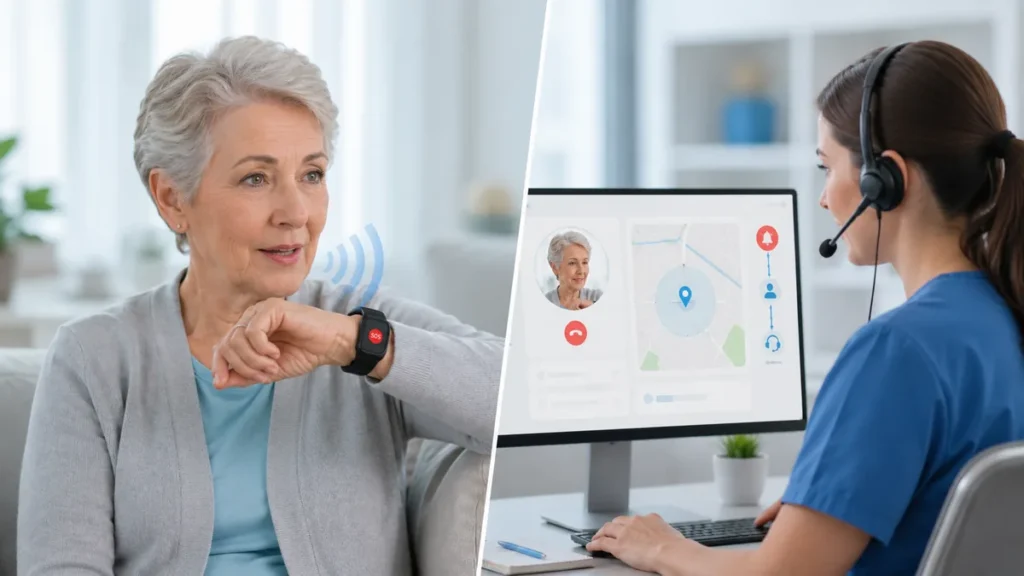
A project may route the initial event to:
- A family or caregiver contact
- A senior care facility team
- A telecare monitoring service
- A centralized response platform
- A predefined sequence of contacts
The correct path depends on who is responsible for receiving and resolving the alert.
For a direct-contact workflow, the watch may attempt to call one or more designated numbers in sequence. For a platform-based workflow, the alert may first appear within an operational dashboard before staff initiate or manage the response.
Neither path is automatically suitable for every project. Direct calling may support a simpler service model, while platform routing may be more appropriate when an organization needs centralized event handling, device records or integration with an existing monitoring system.
Use Location as Supporting Information
Location reporting can provide useful context when the wearer activates SOS away from a known address. It may help the receiving team determine whether the user is at home, within a care facility or in another area.
Location should not be presented as a guaranteed exact position. Its availability and usefulness may depend on the selected device configuration, connectivity, surrounding environment and platform settings.
Before deployment, teams should define:
- When location information is requested
- Whether it is sent automatically with an SOS event
- How recent the reported location must be
- How the location is displayed to the receiving contact
- How unavailable or outdated location data is shown
- Whether location history is required
- Who is permitted to view location information
- How the data is transferred to the application or platform
The receiving interface should present the information in a form that staff can interpret quickly. Coordinates without context may be less useful than a location displayed within the provider’s operational system.
Location data should support the response decision, not replace communication with the wearer or the organization’s established verification procedures.
Plan Battery, Charging and Fleet Management
Battery requirements should be based on the intended operating workflow rather than a single advertised battery-life figure.
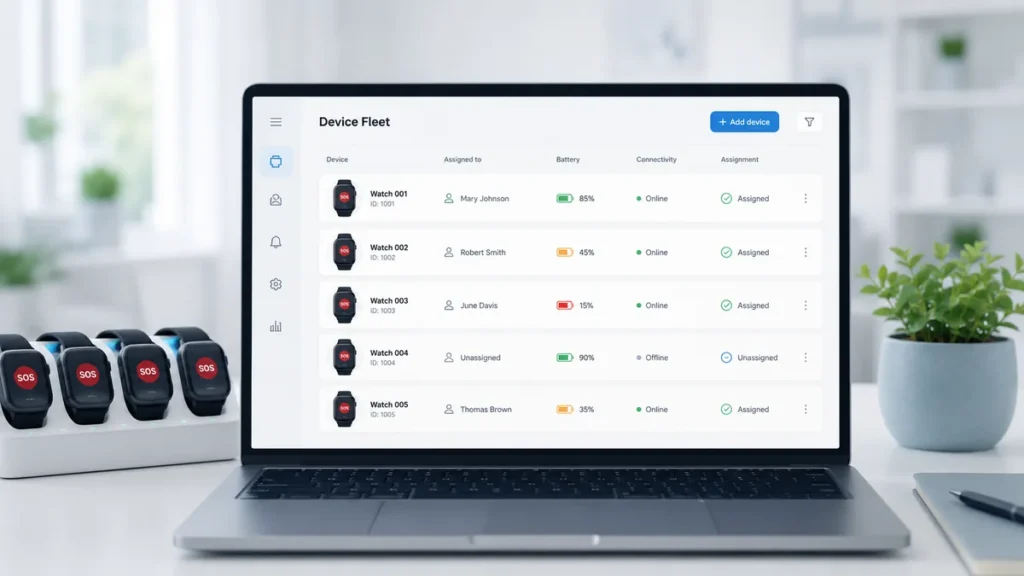
Actual operating time may be affected by voice calls, network communication, location requests, screen use, reporting intervals and other configured functions. A device used for frequent platform communication may have different power requirements from one used mainly for manual SOS activation.
Project teams should define:
- How frequently the watch communicates with the platform
- How often location information may be requested
- Whether the device will be used indoors, outdoors or in both settings
- Who is responsible for charging it
- How low-battery conditions are communicated
- Whether staff need remote visibility into battery status
- What happens when a watch remains offline
- How charging issues are followed up
The charging process should also be tested with the intended user group. Some elderly users may have difficulty handling small connectors or positioning the device correctly on a charger.
A professional program therefore needs more than a charging accessory. It needs a procedure for identifying missed charging, notifying the appropriate person and restoring the device to service.
Define Fleet-Management Requirements Early
Managing one watch is different from operating tens, hundreds or thousands of devices.
Depending on the platform scope and project requirements, fleet-management functions to evaluate may include:
- Device activation and user assignment
- Contact and escalation configuration
- Battery-status visibility
- Online or offline status
- Alert-event records
- Remote configuration updates
- Device replacement and reassignment
- Firmware or software management
- Application, cloud or API integration
These functions should not be assumed to be standard across every configuration. The supplier should clarify which capabilities are included, which are optional and which require software or platform customization.
A small private-label program may need only basic device and contact administration. A multi-site senior care organization or telecare provider may require centralized control, user records, status monitoring and integration with an existing service platform.
Defining these requirements before hardware selection can reduce the risk of choosing a device that works individually but cannot be managed effectively at deployment scale.
Questions to Review With an SOS Smartwatch Supplier
A suitable supplier should be able to discuss the complete SOS workflow, including the relationship between the watch, voice calling, location reporting, contacts and the management platform.
The evaluation should clearly separate:
- Standard device functions
- Optional hardware or software functions
- Configurable workflow settings
- Customized firmware or software functions
- Application and cloud-platform development
- API or system-integration requirements
This distinction is important because a function shown in a general product presentation may not be included in every hardware or software configuration.
Before starting a project, organizations should ask the supplier:
- How can the physical SOS button and activation behavior be configured?
- What happens immediately after SOS is activated?
- How are contacts assigned and updated?
- How does unanswered-call escalation work?
- How is two-way voice initiated and managed?
- When is location information collected and transmitted?
- How are low-battery and offline conditions reported?
- Which fleet-management functions are available?
- What application, cloud or API integration options can be reviewed?
- Which requirements depend on the target market, network or final configuration?
- How will the device and workflow be tested with the intended users?
- Which features are standard, optional or subject to customization?
Testing should reflect realistic conditions rather than only laboratory demonstrations. Useful test scenarios may include accidental button activation, unanswered calls, noisy environments, unavailable location data, low-battery conditions, network interruption and device reassignment.
WearIntell supports wearable development and manufacturing projects for elderly safety, telecare, healthcare and personal safety applications. Relevant project capabilities may include physical SOS controls, configurable contact and escalation flows, two-way voice, location reporting, application or cloud connectivity, API integration and fleet-management support, depending on the selected project scope.
For projects requiring a broader wearable alert product rather than an SOS-focused smartwatch configuration, a Medical Alert Watch may also be discussed during the requirement review. The correct product direction should be determined by the intended users, alert workflow, platform structure and deployment environment.
Conclusion
Selecting an SOS smart watch for elderly safety programs requires more than confirming that the watch has an SOS button, calling function and location capability.
The project team should first define how the alert is activated, who receives it, how voice communication works, when location is reported, what happens when a contact does not answer and how the device fleet will be monitored.
These operational requirements should guide the hardware, software and integration decisions.
WearIntell can review SOS activation, calling, contact routing, location reporting and platform-integration options based on the intended users, service model and target deployment requirements.
Frequently Asked Questions
The SOS button starts a predefined alert process. Depending on the selected device and project configuration, it may initiate a call, send an event to a platform, notify designated contacts or provide available location information. The project should define the press method, activation feedback, cancellation rules, contact order and escalation behavior before deployment.
Is two-way voice necessary for an elderly SOS smartwatch?
Two-way voice can help a caregiver or service team communicate directly with the wearer after an alert. Whether it is required depends on the service model. Providers should evaluate call routing, microphone and speaker performance, callback handling, unanswered-call procedures and how the conversation is incorporated into the wider response workflow.
What fleet-management functions should a telecare provider evaluate?
Requirements depend on deployment size and operating procedures. A provider may need device assignment, remote contact configuration, battery and connectivity visibility, alert records, device replacement processes and integration with an application, cloud platform or API. The supplier should clarify which functions are standard, optional or customized for the project.