
A wearable health monitoring device is a body-worn electronic product that collects selected signals and sends useful data to an app, cloud platform or professional dashboard.
The sensor is only the starting point. A working device also needs electronics to read the signal, firmware to control data collection, a connection method to transmit information and software that makes the data available to the intended user or service team.
For healthcare technology brands and remote-monitoring solution providers, these components need to be considered as one system. A decision made at one layer can affect every other layer. Increasing the sampling frequency, for example, may change processing, memory, transmission and battery requirements.
Understanding the full data path helps product and engineering teams define a wearable project before selecting components or beginning development.
What Does a Wearable Health Monitoring Device Do?
The basic role of a wearable health monitoring device is to collect a selected signal, process the resulting data and report it in a form that another system can use.
The exact function depends on the project. Some health monitoring wearables may collect movement data. Other configurations may use sensors selected for a particular monitoring or measurement requirement.
A typical data process includes four stages:
- A sensor captures a physical or physiological signal.
- The device electronics read and convert the sensor output.
- Firmware processes, stores or organizes the data.
- The device sends selected information to an app, cloud platform or dashboard.
The resulting information may support remote data review, activity monitoring, device management or another defined workflow.
Monitoring should not be confused with medical diagnosis. A wearable may collect and display health-related information, but that does not automatically make it a medical device or make the data suitable for clinical decisions. Medical or diagnostic claims require appropriate validation, documentation and regulatory support for the intended use.
WearIntell develops wearable devices for healthcare, elderly safety and personal safety projects, with hardware and software scope defined according to the intended use and data requirements.
The Main Hardware Components
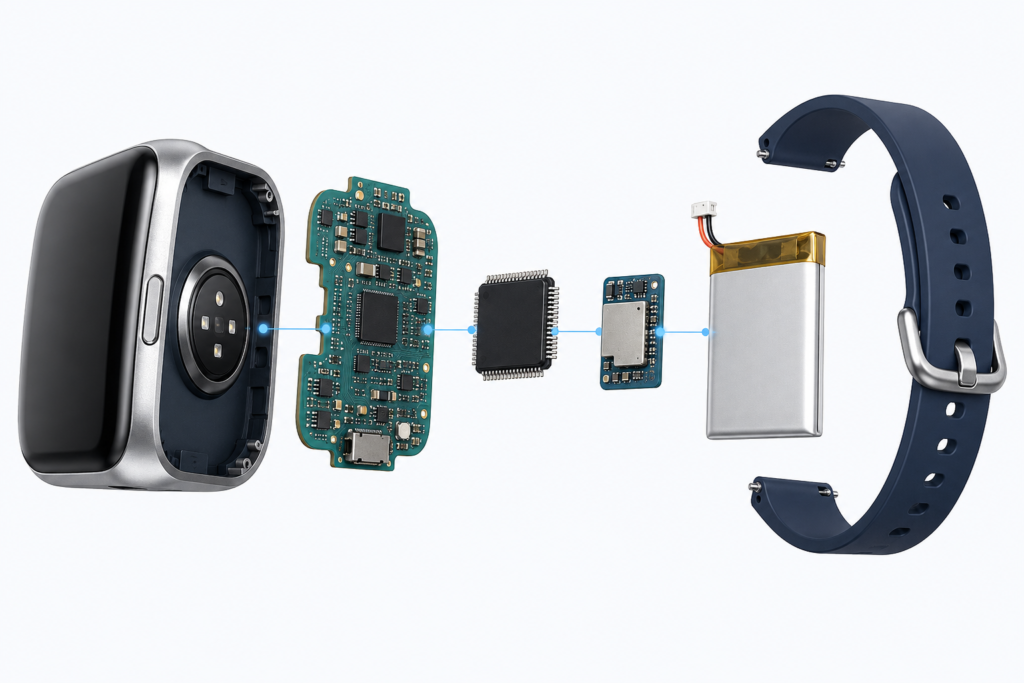
The hardware inside a wearable must work as a coordinated system. Sensors, PCB layout, processing, communication and battery design should not be selected independently.
Sensors
Sensors form the starting point of the data flow. They detect movement, physical conditions or other signals that the project needs to monitor.
Different projects require different sensor types, combinations and placement. Sensor selection can affect:
- The type of data the device can collect
- The required wearing position
- Sampling frequency
- Local processing requirements
- PCB space and layout
- Power consumption
- Firmware complexity
Adding more sensors does not always produce a more useful device. Each additional component introduces new integration, processing and power requirements.
The development team should first define what information the service or platform needs. Sensor selection can then be based on that requirement rather than on the number of available functions.
PCB and Supporting Electronics
The printed circuit board connects the sensors with the processor, memory, battery and communication components.
PCB design must account for more than available board space. The layout may also need to consider sensor position, signal paths, power distribution, antenna placement and the physical structure of the wearable.
A sensor may appear suitable from its technical documentation but prove difficult to position correctly inside the selected enclosure. The PCB, sensor location and product structure therefore need to be planned together.
Microcontroller
The microcontroller unit, or MCU, controls the main functions of the wearable.
Depending on the project, it may:
- Read sensor data
- Manage sampling intervals
- Run firmware logic
- Control memory
- Handle communication
- Monitor power status
- Respond to user input
The required processing capacity depends on what the device must do before data is transmitted.
A wearable that sends basic scheduled readings may require a different processor from one that performs local signal processing, manages multiple sensors or stores data during connection loss.
Battery and Power Management
Battery performance depends on the complete device configuration rather than battery capacity alone.
Sensors, processors, displays and communication modules all consume power. The final operating cycle may also be affected by:
- Sensor sampling rate
- Processor activity
- Wireless transmission frequency
- Display usage
- Local data processing
- Signal conditions
- Background firmware tasks
- Device sleep behavior
Battery optimization usually involves both hardware and firmware decisions. Reporting intervals, sensor activity and low-power states may all need to be adjusted.
A reliable runtime estimate should be based on the final device configuration and realistic operating conditions.
Sensors, PCB electronics, the processor and power system should be planned together within a health monitoring wearable solution rather than treated as separate component choices.
How Firmware Handles Wearable Data
Once a sensor captures a signal, the device must decide what to do with it. Firmware controls most of this process.
Firmware is the software that runs directly on the wearable. It connects the hardware with the operating rules of the product.
It may control:
- When sensors are active
- How frequently readings are collected
- How data is filtered or organized
- When information is stored
- Which information is transmitted
- How the device handles connection loss
- How battery status is reported
- How the device responds to user actions
Local Processing
Raw sensor data is not always sent directly to the platform.
Depending on the project, firmware may first:
- Apply filtering
- Group readings into intervals
- Create a summarized result
- Combine multiple samples
- Identify a configured event
- Add device or time information
The amount of local processing depends on the required output.
A project that needs detailed raw data will use a different architecture from one that reports periodic summaries or selected events. These requirements should be defined before the MCU, memory and communication method are finalized.
Local Storage and Offline Operation
Wearables do not remain connected at all times. A phone may move out of range, a gateway may become unavailable or network conditions may interrupt communication.
The product team should decide how the device behaves during that period.
Questions to define include:
- Should the device store data locally?
- How much information needs to be retained?
- When should stored data be uploaded?
- How should delayed records be identified?
- How should duplicate data be prevented?
- What happens when local storage is full?
These decisions affect memory capacity, firmware behavior and cloud processing.
Offline behavior should be planned early. Adding a reliable storage and recovery process becomes more difficult after the hardware and platform structure have already been fixed.
Configurable Data Reporting
Different services may require different reporting patterns.
One project may need scheduled data uploads. Another may require event-based reporting. A third may store information locally and synchronize it at defined intervals.
Reporting logic may be configured around:
- Data collection intervals
- Upload frequency
- Event conditions
- Connection availability
- Battery targets
- Platform requirements
There is often a practical balance between reporting frequency, power consumption and communication load. The appropriate setting depends on how the information will be used.
Connectivity, Apps and Cloud Platforms
After the data has been processed, it must move from the wearable to another system.
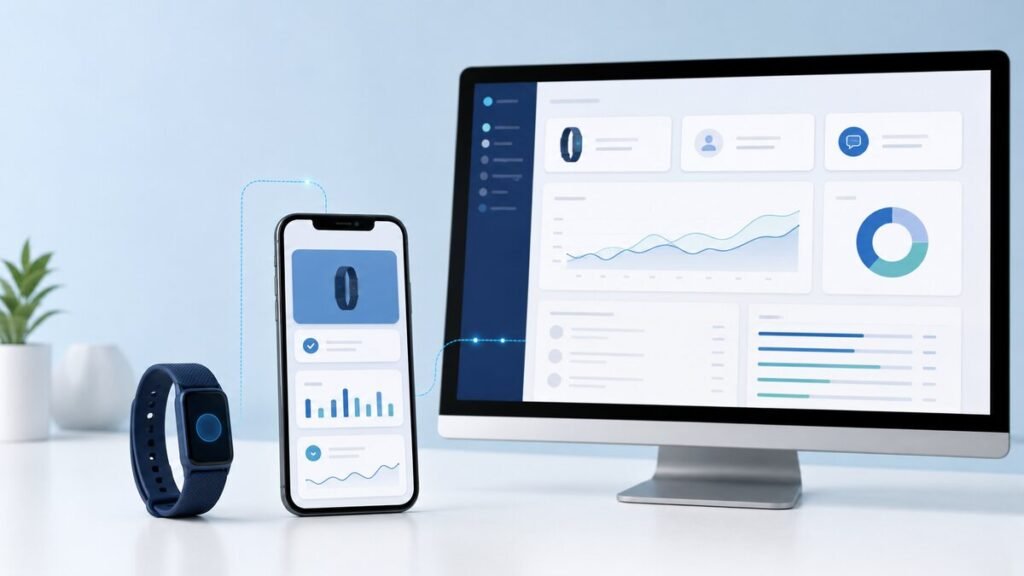
The suitable connection method depends on the deployment model. Some devices may communicate with a nearby mobile app. Other projects may use a supported gateway or another network path, depending on the selected hardware and system configuration.
Device-to-App Connection
In an app-based system, the wearable sends information to a mobile application.
The app may:
- Receive data from the wearable
- Display selected information
- Manage device setup
- Show connection or battery status
- Pass data to a cloud platform
- Send selected settings to the device
This architecture may suit projects where the intended user has access to a compatible phone and the service can depend on that phone being available.
The system still needs to define what happens when the phone is disconnected, unavailable or no longer near the wearable.
Device-to-Cloud or Gateway Connection
Some projects may send data through a supported gateway or another network connection.
This can reduce dependence on a mobile phone, but it also changes the hardware and service requirements. The system may need to manage device identity, authentication, network availability, remote commands and cloud communication.
The connection method should be selected according to the real deployment environment rather than treated as a standalone feature.
Mobile Application
The mobile app is often the first software layer that a user interacts with.
Depending on the project, it may support device setup, connection management, data display, account functions or synchronization.
The app should be designed around the data that the wearable can actually provide. It should not be planned separately from the firmware and cloud structure.
Cloud Platform
The cloud layer receives, stores and organizes data from the wearable, app or gateway.
Depending on project requirements, it may manage:
- Device records
- User association
- Historical information
- Event records
- Configuration settings
- Connections to other systems
API availability does not mean that every requested function or data field is already supported. The available interface, commands and reporting format should be reviewed for the specific project.
Device identifiers, timestamps, reporting intervals and event structures should also be agreed early because they may affect firmware, app, cloud and dashboard development.
Professional Dashboard
A dashboard presents selected information to service teams, operators or other authorized users.
It may show:
- Device status
- Latest reported data
- Battery information
- Connection status
- Historical records
- User or device assignments
- Configured events
The dashboard should support the operating process rather than display every value collected by the device.
A service team may need to identify devices that have stopped reporting. A product team may need to review data from a pilot deployment. These tasks may require different views, permissions and filters.
Planning the Complete Data Flow
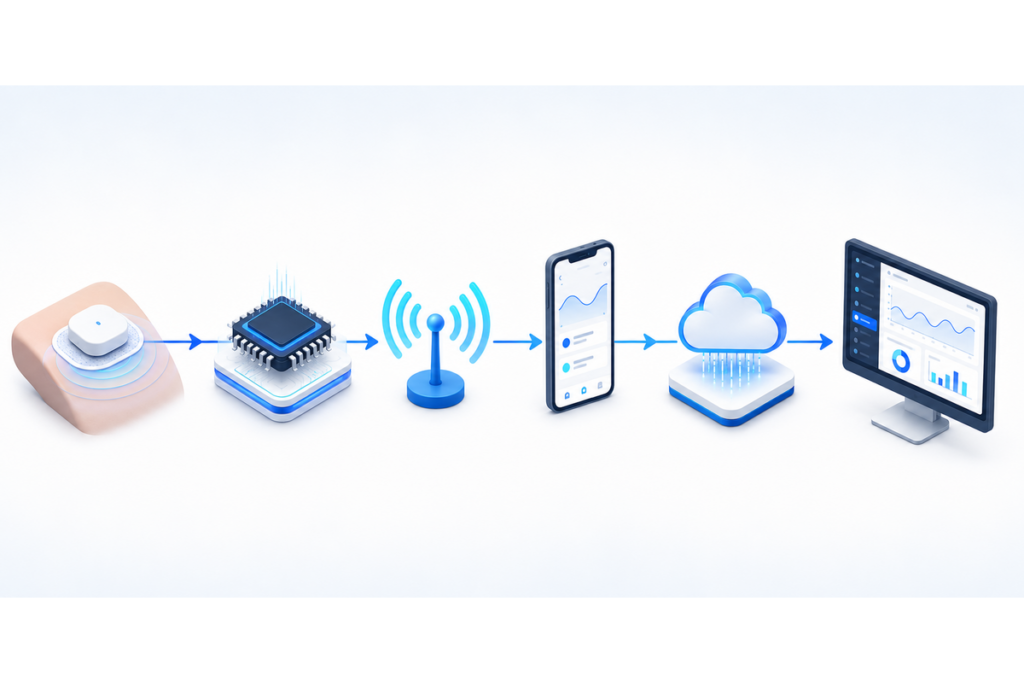
The complete data path can be summarized as follows:
| Stage | Role |
| Sensor | Captures the selected signal |
| PCB and electronics | Connect and support the hardware |
| MCU | Controls processing and device operation |
| Firmware | Organizes, stores and prepares data |
| Connectivity | Transfers information outside the wearable |
| App or gateway | Receives and forwards the data |
| Cloud platform | Stores and manages device information |
| Dashboard or API | Presents or shares selected data |
A useful data flow starts with the final information requirement.
For each data item, the project team should determine:
- Which sensor provides the input?
- How often should the signal be collected?
- What processing should happen locally?
- What information should be stored?
- What should be transmitted?
- Where should the data be displayed?
- What should happen when the connection is unavailable?
This approach helps prevent a common development problem: choosing hardware first and trying to build the reporting workflow around it later.
Before development begins, the team should also define the intended users, wearing position, app requirements, cloud connection, battery expectations and dashboard functions.
Projects that place monitoring within a wider care-service model may also need to consider how the wearable fits into an elderly care wearable solution, including device management, user support and platform workflows.
Certification and regulatory requirements depend on the final device configuration, intended use and target market. They should not be assumed simply because the product collects health-related data.
Conclusion
A wearable health monitoring device is more than a sensor placed on the wrist. It is a connected system made up of sensors, PCB electronics, a processor, firmware, communication and software platforms.
Each component affects the usefulness of the final data. Sensors determine what can be collected. Firmware controls how the information is processed and reported. Connectivity moves the data, while the app, cloud and dashboard determine how it is stored and used.
A wearable health monitoring device project should therefore begin with a clear data flow, reporting requirement and deployment model. Organizations planning a new device can discuss sensor selection, configurable reporting and an appropriate OEM/ODM development path based on their intended users and platform requirements.
FAQs
Is a wearable health monitoring device a medical device?
Not necessarily. A wearable may collect and display health-related information without being classified or validated as a medical device. Classification depends on the intended use, product claims, design and target-market requirements. Monitoring data should not be described as diagnostic or medical-grade without appropriate validation and regulatory support.
Does all wearable data need to be sent to the cloud?
No. Some information may be processed or stored on the device before selected data is transmitted. Local processing may reduce unnecessary communication, while cloud reporting can support historical records, dashboards and system integration. The right balance depends on the required level of detail, connection method, power targets and service workflow.
What should be defined before selecting wearable sensors?
The team should first define what information is needed, where the device will be worn, how frequently data should be collected and how the information will be used. Sensor selection should also consider PCB space, signal conditions, processing requirements, battery consumption and the intended app or cloud architecture.