
“How long does the battery last?” sounds like a simple medical alert watch specification question.
For a connected safety service, it is not.
Runtime changes with cellular conditions, location requests, reporting frequency, voice activity, display behavior, sensors and firmware configuration. Two watches with the same battery capacity can therefore produce very different operating times.
A useful battery requirement should not begin with a target such as “three days.” It should begin with the activities the watch must perform and the charging schedule the service intends to support.
This guide explains how to convert those activities into a battery test profile that can be measured against the intended deployment.
Do Not Treat Standby Time as Deployment Runtime
An advertised or laboratory runtime figure is only meaningful when its test conditions are known.
Consider two scenarios.
One watch remains stationary under strong cellular coverage, rarely wakes its display and requests location only occasionally.
Another is worn throughout the day, moves between different signal conditions, sends regular status updates and performs location, alert and voice activity.
Both may use the same hardware, but their power consumption will not be comparable.
Before using any battery-life figure, identify:
- Hardware and battery configuration.
- Firmware version.
- Cellular mode and signal conditions.
- Location behavior.
- Status-reporting intervals.
- Screen usage assumptions.
- Active sensors.
- Number and duration of voice calls.
- Alert activity.
- Low-battery threshold.
A connected medical alert watch should therefore be evaluated using the configuration that will actually be deployed.
Build the Power Budget Around Activities
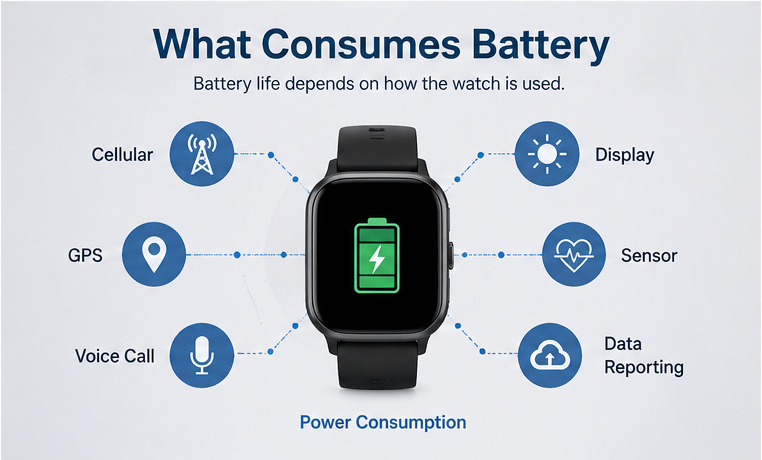
Battery planning becomes more useful when consumption is divided into operational activities.
| Power Activity | Variables That Matter |
| Cellular standby | Network mode, signal strength and registration behavior |
| Network reconnection | Search frequency, failed attempts and time outside coverage |
| Location | Fix frequency, environment, movement and retry behavior |
| Status reporting | Heartbeat, battery and device-reporting intervals |
| Voice | Number of calls, call duration and speaker activity |
| Display | Wake frequency, brightness and active screen time |
| Alerts | Sound, vibration and on-screen prompts |
| Sensors | Sampling frequency and background processing |
| Firmware processes | Logging, synchronization and other background tasks |
The important point is that these activities combine.
An SOS event, for example, may involve user feedback, location acquisition, data transmission and voice communication in a short period.
A weak-network period can create a different load because the modem may repeatedly search for or reconnect to service.
Battery planning should therefore model complete operating periods rather than measure each component only in isolation.
Define Three Battery Test Profiles
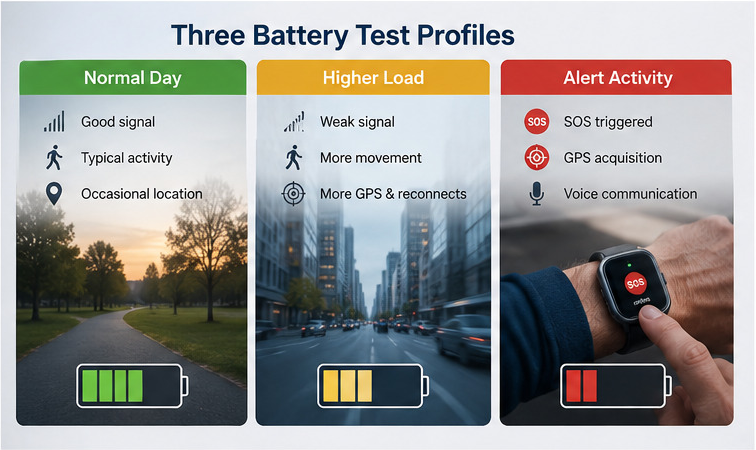
A practical validation plan should include more than one operating condition.
Normal Operating Profile
This profile represents the expected routine day.
Include:
- Normal cellular availability.
- Standard device-status reporting.
- Approved location behavior.
- Typical display interaction.
- Normal sensor activity.
- Expected wearing period.
- Planned charging time.
The target is not simply to see when the watch shuts down.
Determine how much battery should remain when the normal charging window begins.
That remaining capacity becomes part of the operating reserve.
Higher-Consumption Profile
The second profile should represent conditions that increase load but may still occur during normal service.
Examples include:
- More movement between locations.
- Weaker or intermittent cellular coverage.
- Additional network reconnection.
- More frequent location activity.
- Higher display use.
- Additional platform communication.
This profile shows whether the charging model remains practical when the day is less favorable than the laboratory average.
Alert-Activity Profile
The third profile adds the activities associated with the configured emergency workflow.
Depending on the project, this may include:
- SOS activation.
- Alert feedback.
- Location acquisition.
- Data transmission.
- Voice communication.
- Defined retry behavior.
The objective is not to simulate every possible emergency. It is to confirm that the device retains an acceptable reserve when high-priority functions add load to an otherwise normal operating cycle.
Define Location Behavior Precisely
“GPS enabled” is not a useful battery requirement.
The project should define when the watch attempts to obtain location.
Possible rules include:
- At scheduled intervals.
- When a defined event occurs.
- When movement conditions trigger an update.
- When a platform user requests location.
- More frequently during an active alert.
These approaches can produce very different power consumption.
Location attempts may also take longer or require retries under difficult conditions. The battery test profile should therefore include representative environments rather than assume that every fix is obtained quickly.
Avoid specifying “continuous GPS” unless that behavior is truly required and supported by the intended service model.
Treat Cellular Reconnection as a Battery Variable
Strong cellular coverage produces only one part of the battery picture.
When a watch moves through weak or unavailable coverage, the modem may search for a network, attempt registration or reconnect after service returns.
Those activities can increase consumption.
The validation profile should define:
- Expected network mode.
- Representative strong-signal conditions.
- Representative weaker-signal conditions.
- Periods of unavailable service where relevant.
- Reconnection behavior after coverage returns.
This is particularly important for mobile wearables because the user, rather than the device alone, determines where the product travels during the day.
Balance Reporting Frequency Against Runtime
Connected care programs often want current operational information.
Battery level, connectivity status, location and device activity can all be useful, but transmitting information has a power cost.
The solution is not simply to make every interval longer.
Instead, classify reports according to why the service needs them.
Immediate information
Data required as part of an active emergency workflow.
Event-driven information
Updates sent when a relevant condition changes, such as a battery threshold or device state.
Periodic information
Operational information that can be updated at a defined interval.
This structure helps prevent unnecessary communication while retaining the visibility required by the service.
The chosen intervals should then be included in the battery validation profile.
Define the Charging Cycle and Reserve
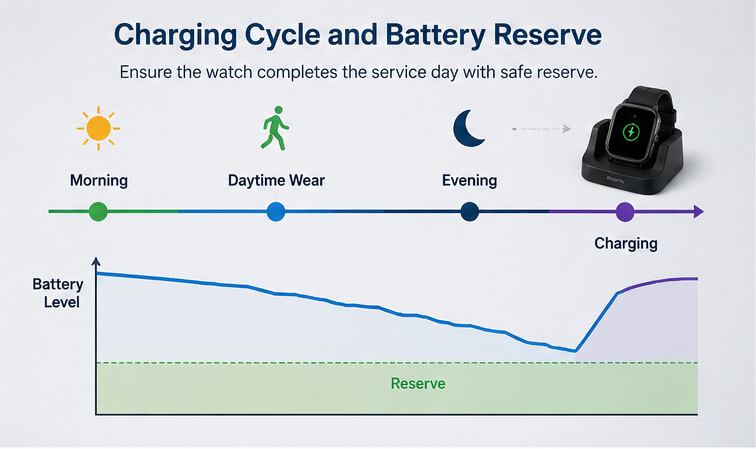
Battery validation should be connected to a charging schedule.
If the service expects users to charge the watch at a predictable point each day or after another defined wearing period, the battery requirement should demonstrate that the device reaches that point with sufficient reserve under the approved profiles.
Define:
- Intended wearing period.
- Normal charging window.
- Expected recharge behavior.
- Low-battery threshold.
- Reserve required before the next charging opportunity.
- Action expected when the battery reaches a defined warning state.
This is more useful than asking for the maximum time from 100% charge to shutdown.
The important operational question is:
Can the watch reliably complete its intended service cycle before charging is required?
Charging usability itself should be reviewed separately from electrical runtime. A technically adequate battery does not guarantee that users will follow the intended charging routine.
Create a Battery Validation Record
Use production-candidate hardware and the firmware and configuration intended for deployment.
For each test cycle, record:
| Evidence | Why Record It |
| Starting battery level | Establish the baseline |
| Test duration | Compare equivalent cycles |
| Reporting schedule | Explain communication load |
| Location activity | Explain positioning load |
| Network conditions | Identify searching or reconnection effects |
| Voice activity | Explain high-consumption periods |
| Alert activity | Show emergency-workflow load |
| Ending battery level | Calculate usable consumption |
| Low-battery events | Confirm warning behavior |
| Configuration version | Keep results tied to the tested build |
Do not combine results from materially different configurations without identifying the change.
A firmware update that changes reporting behavior, network handling or background activity can change battery performance even if the physical battery remains identical.
WearIntell’s wearable R&D capabilities include hardware, firmware and power-management development for project-specific wearable configurations. Battery targets still need to be verified against the final operating profile.
Set Acceptance Criteria Around the Service Cycle
A battery test should end with a decision, not just a chart.
Useful acceptance criteria may state that:
- The normal profile completes the intended wearing period with the agreed reserve.
- The higher-consumption profile remains within the service’s defined charging and warning strategy.
- Alert activity does not create an unacceptable loss of reserve.
- The low-battery state appears early enough for the approved response procedure.
- Results are repeatable across the approved production-candidate configuration.
The actual numbers should come from the project requirements and measured hardware.
Avoid turning a generic runtime assumption into a promised deployment result before those measurements exist.
Revalidate After Relevant Changes
Battery validation is tied to a configuration.
Repeat the relevant tests when changes affect power behavior, including:
- Firmware updates.
- Cellular settings.
- Reporting intervals.
- Location rules.
- Sensor configuration.
- Display behavior.
- Alert or voice workflow.
- Hardware or battery changes.
This prevents a battery figure generated during early development from being carried forward after the product has changed.
For OEM/ODM projects, the approved runtime evidence should therefore identify the hardware, firmware and configuration against which it was produced.
WearIntell can review battery, firmware, connectivity and power-management requirements as part of a connected wearable project.
Frequently Asked Questions
How long should a medical alert watch battery last?
There is no universal target. Runtime should be measured against the intended cellular, location, reporting, voice and alert configuration and the planned charging cycle.
Does GPS reduce medical alert watch battery life?
Location activity consumes power, but the effect depends on how often fixes are requested, environmental conditions and whether retries are required. The location rule should therefore be included in the battery test profile.
Why can weak cellular coverage reduce battery life?
The device may spend additional time searching, registering or reconnecting to a network. Actual behavior depends on the modem, firmware and network configuration.
Should battery testing be repeated after a firmware update?
Repeat relevant tests when the firmware change affects communication, sensors, location, logging, display behavior or other power-consuming functions.
Share your intended connectivity, reporting, location, voice and charging profile with WearIntell to define a battery validation plan for your wearable project.