
A single medical alert watch can often be activated and supported manually. A professional care program operating a larger device fleet needs a repeatable way to identify each watch, connect it with the correct user and response policy, observe its availability and remove it safely from service.
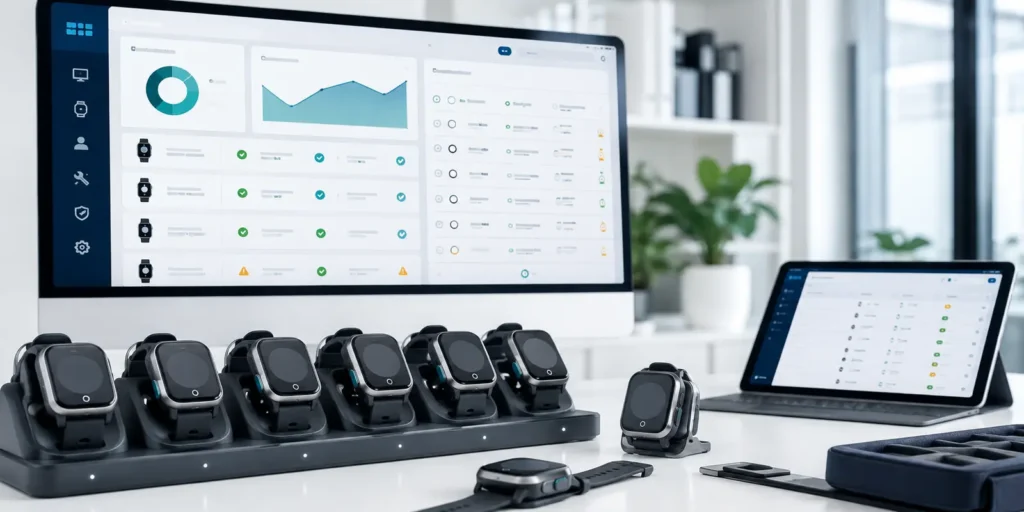
Medical alert watch fleet management covers this complete operational lifecycle. It begins when a device enters inventory and continues through provisioning, assignment, monitoring, maintenance, replacement, reassignment and retirement.
The objective is not simply to count purchased watches. It is to ensure that every active device is connected to the correct user, connectivity profile, service workflow and support record—and that a retired or reassigned watch does not remain linked to the wrong account.
What Medical Alert Watch Fleet Management Includes
Medical alert watch fleet management is the operational discipline used to keep a deployed wearable program accurate, available and supportable.
Its scope may include:
- Inventory and device identification
- Connectivity activation
- Platform registration
- Firmware and configuration records
- User or program assignment
- Emergency-contact or response-policy assignment
- Battery and connectivity visibility
- Last-communication status
- Fault and support history
- Configuration and firmware change control
- Replacement and reassignment
- Connectivity deactivation
- Device retirement and record preservation
The exact functions depend on the approved watch, firmware, connectivity service and management platform. Remote status, remote configuration and over-the-air updates should be confirmed as project requirements rather than assumed to be available on every device.
Fleet management should also be separated from professional monitoring. A management platform may show that a watch is active, connected or assigned. That does not mean trained response personnel or emergency dispatch services are included.
A connected medical alert watch solution is one part of a wider operating model involving the device, connectivity, software platform, support team and human response workflow.
Establish Clear Operational Ownership
Several teams may interact with the same watch without owning the same responsibilities.
The device-management team may control inventory, activation, firmware and technical status. Platform operations may manage accounts, alert routing and permissions. Care or monitoring teams may handle emergency events. Support teams may investigate faults, organize replacements and document service actions.
These boundaries need to be explicit.
A connectivity team may activate a SIM without verifying that the watch is registered to the correct platform account. A support team may send a replacement while the original device remains linked to the wearer. A care team may receive an alert from a watch that still carries the previous user’s contact policy.
A responsibility matrix should identify who owns each transition:
| Lifecycle stage | Typical responsibility |
| Inventory intake | Warehouse or device operations |
| Connectivity activation | Connectivity or platform team |
| Device registration | Platform operations |
| Configuration approval | Product or program owner |
| User assignment | Authorized care or service team |
| Availability monitoring | Fleet operations |
| Fault investigation | Technical support |
| Replacement | Support and device operations |
| Retirement | Device, platform and compliance owners |
The exact division depends on the service model, but every stage should have a named owner and acceptance record.
Map the Device Lifecycle Before Rollout

A deployment should have a documented lifecycle before the first production watches are issued.
A practical sequence is:
Receive → register → activate connectivity → configure → assign → monitor → maintain or update → replace or reassign → retire
Each transition should have an owner, an acceptance check and a record.
Receive and Identify the Device
When a watch enters inventory, record the identifiers needed to distinguish it from every other unit.
Depending on the platform, these may include:
- Serial number
- Device ID
- IMEI
- Model
- Hardware revision
- Current firmware version
- Initial inspection result
The objective is to establish a reliable identity before the device is activated or assigned.
A watch that cannot be matched consistently across inventory, connectivity and platform systems becomes difficult to support later.
Register the Watch
Registration creates the device record used by the management platform or backend.
The process should verify that the identifier entered into the platform matches the physical watch. If registration relies on manual entry, a second check or scan-based method should be used where available.
Registration alone does not mean that the watch is ready for a wearer. It may still need connectivity activation, configuration, assignment and functional verification.
Activate Connectivity
A cellular medical alert watch may require a SIM, eSIM or another connectivity profile.
The activation process should define:
- Who supplies the connectivity profile
- Who activates it
- Which device identifier is linked to it
- Whether APN or related settings are required
- How successful network registration is confirmed
- What happens when activation fails
- Who can suspend or deactivate the service
The process should verify actual communication. A provider portal may show an active subscription while the physical watch remains unable to connect to the intended network.
Configure the Device and Service Policy
Configuration may include:
- Language
- Reporting behavior
- Approved emergency functions
- Platform endpoint
- Contact or escalation policy
- User-interface settings
- Other project-specific controls
Settings should come from an approved configuration profile rather than being entered differently for each watch.
If different user groups require different behavior, the program can define controlled profiles such as home care, assisted living or staff safety. Each profile should have a version, an owner and an approval record.
Some settings may be applied remotely. Others may require local setup, firmware changes or a provisioning tool. The supported method should be confirmed for the final device and platform.
Assign the Watch to the Correct User or Program
Assignment creates the operational link between the physical device and the wearer, resident, staff member or program account.
The assignment record may include:
- Device identifier
- User or program identifier
- Activation date
- Response policy
- Authorized contacts
- Service location or organization
- Applicable configuration profile
- Support status
Only the data required by the service should be stored. Personal or health information should not be added simply because the platform provides an empty field. Data scope and access should follow the organization’s approved policies.
Complete a Handoff Check
Before a watch is issued, confirm that the physical device, platform record, assigned user and response policy agree.
A handoff check may include:
- Correct device and user assignment
- Successful network registration
- Approved firmware version
- Correct configuration profile
- Correct alert destination
- Available battery status
- Successful test communication
- Charger and instructions included
- User or staff orientation completed
- Handoff accepted by the responsible team
A watch should not be marked as deployed merely because it has left the warehouse.
Maintain a Reliable Device and User Record
The device record is the foundation of fleet management.

At minimum, the organization should be able to determine:
- Which device is in service
- Which user or program it belongs to
- Which configuration it should run
- Whether connectivity is active
- What changes have been made
- What faults or support actions have occurred
- Whether the watch has been replaced, reassigned or retired
Useful record categories include:
Device identity: serial number, device ID, IMEI, model and hardware revision where applicable.
Software identity: firmware version, configuration profile and relevant application or protocol version.
Connectivity: SIM or connectivity profile, activation status and responsible service partner.
Assignment: current user or program, assignment date and response-policy reference.
Operational status: inventory, provisioning, active, suspended, under repair, replacement pending, reassigned or retired.
Support history: reported faults, troubleshooting actions, repairs and replacements.
Change history: firmware updates, configuration changes, assignment changes and responsible operators.
Not every platform exposes the same fields. The record model should be validated against the final management system.
Prevent Broken Identity Links
Replacement illustrates why identity control matters.
Suppose a user’s original watch is replaced after a battery or communication fault. The new unit is activated, but the care platform remains linked to the old device ID.
The organization may then have three conflicting records:
- Inventory shows that the replacement was issued.
- Connectivity shows that the new watch is active.
- The care platform still associates the wearer with the old device.
The replacement is complete only when the old relationship has been closed, the new relationship has been verified and the alert route has been tested.
Standardize Provisioning and Assignment
Provisioning should be repeatable enough that different authorized operators produce the same result.
A standard process can cover:
- Device identification
- Connectivity setup
- Platform registration
- Firmware verification
- Configuration-profile application
- User or program assignment
- Response-policy association
- Functional testing
- Handoff approval
- Record completion
Controlled profiles and validation rules are safer than free-form setup.
The system should also prevent duplicate or conflicting assignments. One watch should not remain assigned to two active users unless the platform supports that relationship and the service has a documented reason.
Provisioning records should identify who completed the setup and who approved it.
Monitor Device Availability Before an Emergency
An emergency-event dashboard shows what happens after a user requests help. Fleet operations also need to know whether a watch is capable of participating in that workflow before an emergency occurs.

Depending on platform support, relevant operational signals may include:
- Battery status
- Last successful communication
- Cellular or platform connection state
- Firmware version
- Assignment status
- Unresolved technical fault
- Update result
- Hardware or service warning
- Connectivity activation state
A lack of alerts does not prove that a watch is working.
The wearer may simply not have needed help. The watch may also be silent because its battery is depleted, connectivity has failed, assignment was incomplete or the platform has stopped receiving reports.
That makes last communication, or an equivalent status, useful where supported. The program should define when an unobserved device requires review based on its approved reporting behavior.
Control Configuration and OTA Changes
Configuration and firmware changes may affect connectivity, power use, interface prompts, alert routing and backend integration.
For that reason, medical alert watch OTA updates and remote configuration should follow a controlled process:
- Authorized change request
- Defined target models or device groups
- Approved version and release notes
- Compatibility review
- Pilot or staged rollout
- Update-result visibility
- Failure and retry handling
- Recovery plan where supported
- Post-update functional verification
- Final deployment record
Updates should not be sent to the entire fleet merely because the platform makes it technically possible.
A staged rollout allows the team to confirm installation, connectivity, power behavior and platform communication on a limited group before expanding deployment.
The program should also define what happens when a watch is offline during the update window, loses power during installation or reports an uncertain result.
“Update initiated” is not the same as “installed and verified.”
WearIntell can review firmware, connectivity and device-management requirements against the proposed hardware and software configuration. The supported controls and recovery options should be confirmed before they are included in the operating model.
Preserve Event and Service History
A reliable record should show both emergency activity and the service actions that may have affected the watch.
Depending on organizational requirements, history may include:
- Event trigger time
- Alert transmission status
- Delivery and acknowledgement status
- Available location status
- Device or network fault
- Configuration change
- Firmware update
- Assignment or reassignment
- Support action
- Replacement
- Suspension or deactivation
- Closure reason
This history helps teams reconstruct what the system knew at the time of an event.
It may also reveal recurring operational problems. Repeated connectivity failures can indicate a provisioning or network issue. Frequent replacements may point to a charging, training or environmental problem. Assignment corrections may show that the handoff process needs stronger controls.
Retention periods, access rules and export requirements should be defined by the appropriate operational, privacy and compliance teams.
Manage Replacement and Reassignment Carefully
Replacement and reassignment are high-risk transitions because they change the relationship between the watch, platform account and response policy.
A replacement procedure should:
- Identify the original and replacement devices
- Preserve required event and service history
- Suspend or remove the old active assignment
- Transfer only approved settings and contacts
- Activate and verify the replacement
- Confirm the correct user and response policy
- Test the alert route
- Update inventory and support records
- Disable connectivity on the old device where appropriate
- Record the original watch’s final disposition
Before a returned watch is reassigned, the previous relationship should be closed. User-specific settings, stored credentials and contact information should be removed according to the approved design.
The watch should then be inspected, updated, provisioned and assigned as if it were entering service again.
A factory reset may not remove backend assignments or deactivate network service. Platform and connectivity records may require separate action.
Retire Devices Without Leaving Active Records
Retirement is not only a physical disposal step.
A retired watch should no longer appear as an active endpoint in the response system. Its connectivity should be disabled or reassigned, its user relationship should be closed and its final status should be visible to support staff.
A retirement process may include:
- Final device identification
- Removal of active user assignment
- Connectivity deactivation
- Platform de-registration or retired status
- Removal of approved credentials and personal data
- Preservation of required event and service records
- Refurbishment, recycling or disposal decision
- Closure approval and date
The system should prevent retired devices from generating unexpected events or being mistaken for unresponsive active watches.
Turn Lifecycle Needs into Deployment Requirements
Before selecting or integrating a platform, document the required operating model.
Identity and Assignment
- Which identifiers are available?
- Can inventory, connectivity and platform records use the same identifier?
- How are duplicate records prevented?
- Can assignment history be preserved?
Provisioning
- How is connectivity activated?
- Who controls SIM, eSIM or APN settings where applicable?
- How is the device registered?
- Can approved profiles be applied consistently?
- Which checks are required before handoff?
Visibility
- Which device-health signals are available remotely?
- Can the platform show last communication, battery, firmware and assignment?
- How are stale or unavailable values displayed?
- Which conditions generate an operational task?
Change Control
- Are remote configuration or OTA updates supported?
- Can deployment be staged by device group?
- Which roles can authorize a change?
- How are failures, retries and version results recorded?
- Which recovery options are available?
Service History
- Which emergency and technical events are logged?
- How are support actions attached to the device record?
- Can operations distinguish device faults from network or platform faults?
- How are unresolved issues assigned and closed?
Replacement and Retirement
- How is the old user-device relationship removed?
- Which settings and records move to a replacement?
- How is reassignment controlled?
- How is connectivity disabled?
- How is a retired watch prevented from remaining active?
Commercial responsibilities for connectivity, platforms and monitoring should also be defined. This guide to medical alert watch service costs and responsibilities explains those boundaries separately from device fleet operations.
Conclusion
Medical alert watch fleet management protects service continuity as a program grows.
A deployment-ready watch must remain identifiable, configurable, observable and supportable throughout its service life. The program must know who or what the device is assigned to, whether it is available, which configuration it is running and what happens when it is replaced, reassigned or retired.
The strongest operating model connects device identity, user assignment, connectivity, platform status and response policy without allowing those records to drift apart.
FAQs
What is medical alert watch fleet management?
It is the process of identifying, provisioning, assigning, monitoring, updating, supporting, reassigning and retiring watches across a professional care program. It connects each physical device with the correct connectivity profile, platform record, user assignment and response policy.
Which device information should a care program monitor remotely?
Depending on platform support, useful information may include battery status, last communication, connectivity state, firmware version, assignment status, update result and unresolved faults.
Can medical alert watches receive remote firmware updates?
Some platforms support OTA firmware updates or remote configuration, but the capability is not universal. Programs should confirm compatible models, staging controls, permissions, failure handling and post-update verification.
How should a replacement watch be assigned?
The program should close or suspend the old device relationship, preserve required records, activate the replacement, apply approved settings, connect it to the correct user and response policy, and test the alert route.
What should happen when a watch is retired?
The active user assignment should be removed, connectivity should be disabled or reassigned, the device should be marked as retired, approved credentials and personal data should be removed, and required event and service records should be preserved.