
Choosing fall detection watches for a senior care program requires more than comparing device features. Care providers must confirm that residents can wear and operate the watch, that alerts reach the intended responders, and that staff can manage devices throughout daily use.
Before deployment, organizations should test fall-alert confirmation, manual SOS, voice communication, location reporting, charging routines, and compatibility with their monitoring platform.
This guide explains how to evaluate these requirements and what evidence to request from a supplier before approving devices for a care program.
Why the Alert Workflow Matters
A watch with fall detection does not operate in isolation. Its practical value depends on what happens before, during and after a possible fall event.
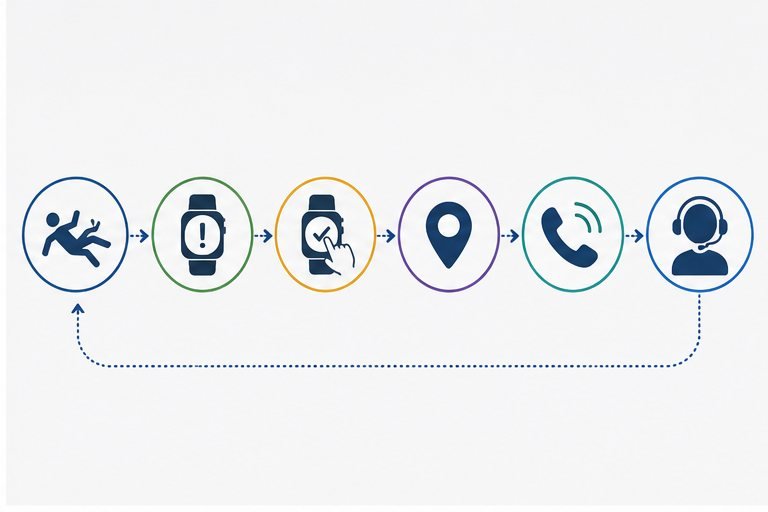
Before an event, the user must be willing and able to wear the device correctly. During an event, the watch interprets movement data according to its sensor configuration and detection logic. After an event, the device or connected system may need to confirm the alert, collect available location information, open a voice channel and notify the appropriate caregiver or monitoring platform.
A possible fall-alert workflow may include:
- The watch identifies movement that matches the configured fall-detection conditions.
- The device begins an alert-confirmation process.
- The user is given an opportunity to cancel an accidental alert, depending on the selected configuration.
- Available location and device-status information are collected.
- The watch initiates a voice call or sends an event to a connected platform.
- The care team follows its defined response and escalation procedure.
Each stage can affect the final outcome. A care program should therefore avoid treating automatic fall detection as a single checkbox in a product specification.
It is also important to recognize the limitations of wearable fall detection. Performance may depend on the movement type, wearing position, sensor configuration, detection logic and alert settings. No wearable should be expected to identify every fall or eliminate every false alert.
Manual SOS should remain available as an additional way for the wearer to request assistance when automatic detection is not triggered or when the user notices another safety concern.
6 Criteria for Evaluating a Smart Watch for Seniors with Fall Detection
A structured evaluation helps care programs compare possible devices without relying on broad product claims or consumer-focused feature lists.
| Evaluation Area | Questions to Review |
| Usability | Can the intended users wear, operate and charge the watch consistently? |
| Alert reliability | How is a possible fall detected, confirmed, cancelled and escalated? |
| Communication | Can the wearer communicate with a caregiver or monitoring center after an alert? |
| Location | Which location methods are available for the expected deployment environment? |
| Battery management | How will charging, low-battery reporting and device availability be managed? |
| Platform support | Can alerts, location and device status connect with the required software system? |
These areas should not be reviewed independently.
More frequent location reporting, for example, may increase power consumption. A longer alert-confirmation period may help reduce unnecessary escalations but could also delay notification. A more complex interface may provide additional functions while making the watch harder for some users to operate.
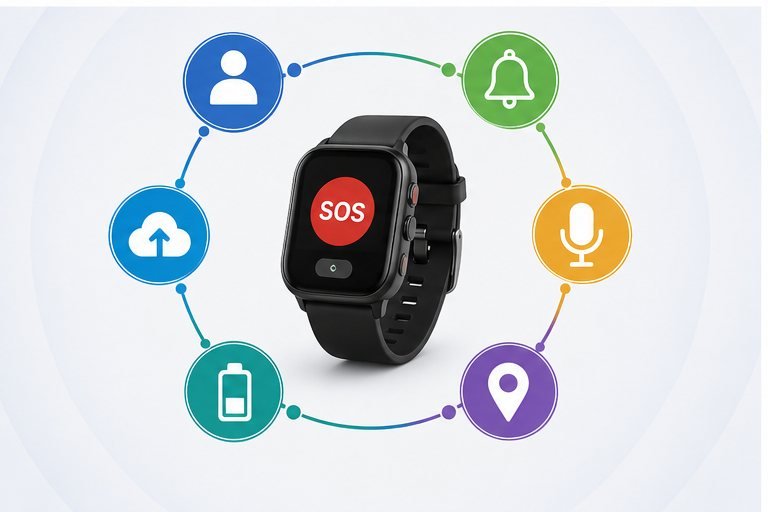
The appropriate balance depends on the intended user group, deployment environment, service model and response procedure.
Usability and Alert Reliability
Usability is one of the most important considerations in a senior wearable project. A function cannot support the care program when the device is not worn correctly, is left uncharged or is difficult to operate.
Physical and Interface Usability
The evaluation should begin with the intended users rather than with the product specification sheet. Older adults may have different levels of vision, hearing, dexterity, mobility and familiarity with wearable technology.
Relevant questions include:
- Is the screen information easy to read?
- Is the SOS control easy to locate and press?
- Can the watch be worn securely in the intended position?
- Are voice prompts and alert sounds easy to understand?
- Is the charging process practical for users or care staff?
- Are unnecessary menus or gestures likely to cause confusion?
- Can the interface be adapted to the service workflow?
Wearability can also affect fall-detection performance. A loosely worn device, inconsistent wearing position or regular removal during daily activities may influence the movement data available to the watch.
For elderly care programs, including assisted living, home care and community deployments, usability should also be evaluated from the staff perspective. Care teams may need a consistent process for assigning watches, checking device status, managing charging routines and replacing unavailable units. Care teams may need a consistent process for assigning watches, checking device status, managing charging routines and replacing unavailable units.
Configurable Fall-Detection Logic
Smart watches that detect falls generally evaluate movement data for patterns that may indicate a fall. Depending on the device design, this may involve acceleration, orientation changes, impact and inactivity after movement.
The practical result can vary according to the detection thresholds and alert logic selected for the project.
A more sensitive configuration may identify more possible events but may also produce more false alerts. A less sensitive configuration may reduce unnecessary notifications but could fail to identify some movements. There is no single configuration that is suitable for every user group or care environment.
Professional buyers should discuss:
- Which movement conditions start the detection process
- Whether detection parameters can be configured
- Whether different user groups can use different settings
- How inactivity after a possible impact is evaluated
- Whether the wearer can cancel an accidental alert
- How long the alert-confirmation period lasts
- Whether confirmation occurs on the watch, through the platform or through a voice call
- How manual SOS works when automatic detection is not triggered
WearIntell’s fall detection watch solution can be configured around project-specific fall logic, alert confirmation and manual SOS requirements. The final workflow should be defined around the care program rather than assumed from a standard consumer configuration.
Communication, Location and Battery Requirements
Communication, location and battery performance are closely connected. A care program should evaluate how these functions operate together under realistic usage and network conditions.
Two-Way Voice Communication
Two-way voice may allow the wearer and care team to communicate after an alert, depending on the selected hardware, network and service configuration.
Voice communication can help a responder understand whether the user needs assistance, whether the alert was accidental and what type of response may be appropriate. It can also reassure the wearer that the alert has been received.
Important questions include:
- When does the voice call begin?
- Does the watch call a predefined contact, monitoring center or other endpoint?
- Can the monitoring platform initiate a call to the watch?
- What happens when the first contact does not answer?
- Can the call sequence be configured?
- How are poor-signal or failed-call conditions handled?
- Are the speaker and microphone suitable for the expected environment?
The device itself cannot guarantee that a caregiver will answer or that emergency assistance will arrive. Response outcomes depend on network availability, platform operation and the care organization’s escalation process.
Location Reporting
Location information can help care teams understand where a wearer may be when an alert occurs. Depending on the selected configuration, a wearable project may support GPS, Wi-Fi or cellular location methods.
The appropriate approach depends on the deployment environment. GPS may be more useful outdoors, while Wi-Fi or cellular-based positioning may contribute additional information where satellite signals are limited.
No location method should be assumed to provide exact positioning in every building or environment.
Evaluation questions should include:
- Will the watch be used mainly indoors, outdoors or in both environments?
- When should the device obtain or transmit a location?
- How recent must the reported location be?
- What should the platform display when precise positioning is unavailable?
- Does the program require event-based, scheduled or on-demand location reporting?
- How will the selected reporting frequency affect power consumption?
Location should support the response workflow without creating unrealistic expectations about accuracy.
Battery and Charging Operations
Battery evaluation should focus on the intended usage pattern rather than a single advertised runtime figure.
Voice calls, location updates, cellular connectivity, screen activity, signal quality and alert frequency may all affect power consumption. Because the final result depends on the selected configuration, care programs should request battery information and testing based on realistic operating conditions.
Operational questions include:
- How often is the watch expected to be charged?
- Who will be responsible for charging it?
- Can the intended users place it correctly on the charger?
- Does the connected platform report low-battery status?
- Can care teams identify devices that have stopped reporting?
- How long is the watch unavailable during charging?
- Will the program need spare devices or a rotation process?
A longer nominal battery life does not automatically solve charging problems. A clear charging routine, low-battery alert and remote device visibility may be equally important for a professional deployment.
Platform Integration and Supplier Evaluation
The final evaluation area is whether the watch can operate within the organization’s monitoring, device-management and response environment.
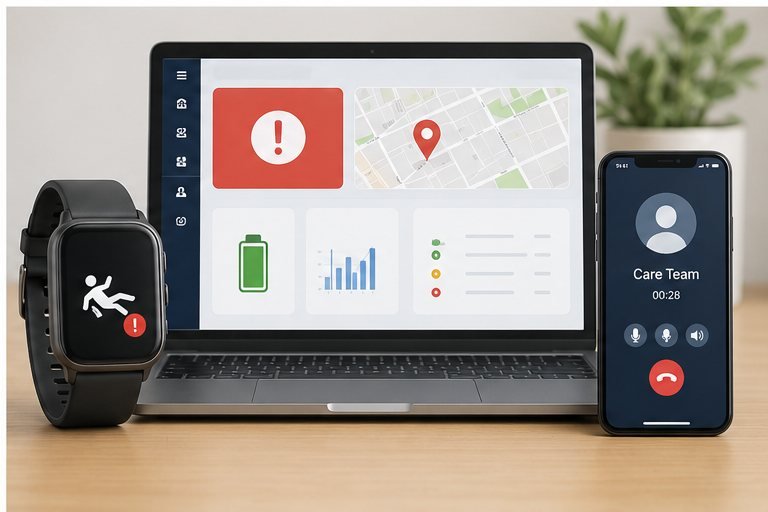
A small pilot may be manageable through direct calls and basic settings. A larger deployment may require device assignment, alert records, battery reporting, location display, remote configuration and integration with an existing monitoring platform.
Define the Required Data Flow
Before discussing APIs or SDKs, the care program should document what information must move between the watch and the platform.
Depending on project requirements, this may include:
- Device identification
- User assignment
- Automatic fall events
- Manual SOS events
- Alert status
- Event time
- Available location information
- Battery level
- Connectivity or device-status information
- Call or escalation status
The exact data fields and integration methods depend on the selected device configuration. API or SDK availability should not be assumed to include every function required by the project.
Engineering teams should review the available protocol, authentication process, event structure, command support and data format before committing to an integration model.
Remote device management may also be relevant. Depending on the project, the care organization may need to review device status, adjust selected settings or manage a fleet of watches without handling every unit individually.
Questions to Discuss With a Supplier
Supplier evaluation should cover both the device and the development process.
Useful questions include:
- Which functions are standard, optional or project-specific?
- Which fall-detection parameters can be configured?
- How does alert confirmation work?
- How is manual SOS handled?
- Which voice, location and connectivity options are available?
- What device information can be reported remotely?
- Which API or SDK functions are available for technical review?
- Can the firmware or alert workflow be customized?
- How are device settings managed after deployment?
- Which tests are recommended for the intended user group and environment?
- Which certification or network requirements may apply to the final configuration?
Certification requirements may vary according to the hardware, radio configuration, intended use, target market and selected network. They should be assessed for the final product configuration rather than inferred from another device version.
WearIntell wearable device development supports healthcare, telecare, elderly safety and personal safety projects. Relevant project options may include configurable fall-detection logic, alert confirmation, manual SOS, GPS/Wi-Fi/cellular location, two-way voice, API/SDK cooperation and remote device management.
Depending on the intended service model, the final configuration may focus on fall detection, elderly safety or medical alert workflows. The product definition should follow the required operating process rather than the product name alone.
Frequently Asked Questions
Can a fall detection watch identify every type of fall?
No. Detection performance may vary according to movement type, wearing position, sensor configuration, detection logic and alert settings. Some daily activities may resemble falls, while certain falls may not create the expected movement pattern. Care programs should evaluate both missed-event risk and false alerts while retaining manual SOS as an additional way to request assistance.
What is the purpose of alert confirmation?
Alert confirmation provides a step between identifying a possible fall and escalating the event. Depending on the configuration, the wearer may be able to cancel an accidental alert, or the event may be reviewed through a platform or voice call. The confirmation process should balance false-alert management with the response speed required by the care program.
Should a care program prioritize battery life or location reporting?
Neither requirement should be considered independently. More frequent location updates may consume more power, while limited reporting may provide less current information during an alert. The appropriate balance depends on the deployment environment, alert workflow, network conditions and charging process. The final configuration should be tested using realistic operating conditions.
Conclusion
A smart watch for seniors with fall detection should be evaluated as one part of a complete care-program workflow. Usability, configurable detection logic, alert confirmation, manual SOS, voice communication, location reporting, battery management and platform integration can all affect whether the solution is suitable for deployment.
The evaluation should begin with the intended users and response procedure, followed by the required hardware, firmware and software configuration. Clear requirements also make it easier to compare supplier proposals without relying on unsupported accuracy claims or consumer-style feature lists.
Organizations planning a fall-detection wearable project can discuss their intended users, alert workflow, location requirements and platform integration needs with WearIntell to evaluate a suitable device configuration.